Best Practice Guide
3rd Party Access
to Operational Technology
in Critical Infrastructure
A Complete Best-Practice Guide For Increased Cybersecurity & Operational Resilience
30.03.2026
Table of Contents
- Executive Summary & The Four Scenarios
- Where BifrostConnect Fits
- Definitions and Key Terms
- Implementation Notes and Known Constraints
- Why Now
- Threat Model for 3rd Party Remote Access in OT
- Scenario 1: Small OT — Software on Engineering Station
- Scenario 2: Large OT — Software on Engineering Station
- Scenario 3: Small OT — Software on Technician PC (3rd Party)
- Scenario 4: Large OT — Software on Technician PC (3rd Party)
- Comparative Summary & Structural Insight
- Where BifrostConnect Fits in the Architecture
- Compliance, Integration & References
Executive Summary
Every time a vendor technician connects remotely to a PLC, SCADA system, or engineering station, the asset owner faces a choice: trust the connection blindly or govern it. This guide provides the framework for governance.
This is not theoretical. Colonial Pipeline (compromised VPN credentials), TRITON (lateral movement to safety systems), and the 2023 Danish energy sector attack (22 companies via firewall vulnerabilities) all exploited remote access paths.
The Four Scenarios
Third-party OT access varies along two dimensions: organization size (infrastructure available for security controls) and software location (who owns the execution environment). These two variables produce four distinct scenarios, each with different risk profiles and solution architectures:
| SW on Engineering Station | SW on Vendor Technician PC | |
|---|---|---|
| Small OT |
Scenario 1 Access governance challenge Customer owns licenses. No AD, no server infra. Security must be architectural. |
Scenario 3 Highest proportional risk Vendor laptop on OT network. No infra to contain it. Supply chain entry point. |
| Large OT |
Scenario 2 Speed vs. security tradeoff Customer owns licenses. Enterprise infra exists but emergency access bypasses controls. |
Scenario 4 OT protocol blindness Vendor laptop with layered containment. SOC blind to OT protocols. |
Where BifrostConnect Fits
BifrostConnect provides the access governance and forensic accountability layer in OT remote access architectures. It is not an endpoint protection tool, not a network monitor, and not a PAM replacement. It governs who connects, constrains what they can reach, and provides forensic evidence of what happened.
- Scenarios 1 & 2 (customer owns licenses): AccessGuard delivers mandatory MFA, scoped application access, and H.264 session recording directly on engineering stations. No AD or server infrastructure required.
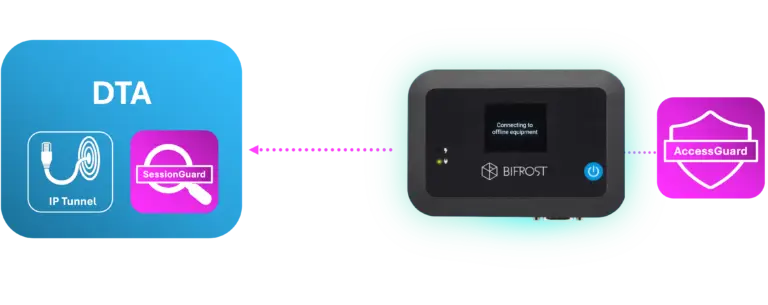
- Scenarios 3 & 4 (vendor owns licenses): The Bifrost Unit scopes network access. SessionGuard records the operator's screen during tunnel sessions. The vendor's laptop is contained and monitored.
- All scenarios: Bifrost Unit provides out-of-band hardware access (4G/satellite). The Bifrost Unit maintains an outbound encrypted connection to Bifrost Manager. There are no inbound connections, no open ports, and no direct exposure of OT endpoints to the internet or to remote operators. The access path from operator to OT endpoint exists only for the duration of an active session.
Intended Audience
CISOs, OT security architects, compliance officers, and risk managers at critical infrastructure operators. Also relevant for system integrators, MSSPs, and auditors.
Regulatory Foundation
All recommendations map against NIS2, the Danish NIS2 Implementation Act, the SAMSIK NIS 2-loven implementation guidance (June to August 2025), BEK 260, IEC 62443, CER Directive, ISO 27001, NIST SP 800-82, and NCSC UK Secure Connectivity Principles. Full citations with section numbers are in the Sources and References chapter.
Methodology and Limitations
This is BifrostConnect's analysis of best-practice remote access architecture based on publicly available regulatory texts, international standards, and operational experience. The recommendations and scenario assessments reflect BifrostConnect’s perspective as a vendor in this space; readers are encouraged to evaluate them in that context. It is not an independent audit or legal advice. Organizations should verify regulatory applicability with qualified counsel.
Scope Exclusions
This guide covers third-party remote access to OT systems via controlled conduits. Explicitly out of scope: remote access to Safety Instrumented Systems (SIS), which per IEC 61511 and IEC 62443-3-2 should be physically or logically isolated from all remote connectivity andmaintained exclusively through local, physical access using dedicated engineering workstations; on-premise PAM architectures (CyberArk, BeyondTrust); cloud OT setups (AWS IoT, Azure IoT Hub, MindSphere); IT/OT convergence scenarios (shared SD-WAN/AD); and physical access controls (badges, escorts). See IEC 62443-3-3 SR 1.1-1.3 and NIST SP 800-82 Section 5.1 for PAM integration; ENISA Good Practices Section 4.3 for cloud OT.
Definitions and Key Terms
| Term | Definition |
|---|---|
| OT | Operational Technology - industrial control systems including SCADA, PLCs, RTUs, and HMIs used to monitor and control physical processes in critical infrastructure. |
| 3rd Party Access | Any remote or on-site access to OT systems by personnel external to the asset owner organization, including vendor technicians, system integrators, managed service providers, and consultants. |
| Controlled Conduit | A managed, auditable communication path between network zones that enforces access policies, logging, and session control. Replaces the binary concept of 'air-gap' which is rarely achievable in practice when remote vendor access is required. |
| Ad-Hoc Access | Access that does not exist until intentionally activated. No persistent path, no open port, no dormant session. Each session is identity-bound, time-limited, and recorded. Contrast with always-on VPN or persistent RDP connections. |
| Out-of-Band (OOB) | A communication channel independent of the primary operational network. Typically using LTE/4G/5G or satellite connectivity to bypass dependencies on the site's production network. Out-of-band access provides an independent network path; it is not equivalent to air-gap isolation. |
| Direct Native Access (DNA) | BifrostConnect's browser-based, clientless remote access. Uses WebRTC for KVM, Serial Terminal, or SSH sessions. No software installation required on either side. Session-based (no persistent tunnel). |
| Direct Tunnel Access (DTA) | BifrostConnect's WireGuard-based network-level access via lightweight installed client application. Provides IP-level routing to specific endpoints behind the Bifrost Unit via subnet mappings. Supports one-to-one, one-to-many, and many-to-one communication patterns. |
| Direct Clientless Tunnel Access (DCTA) | BifrostConnect's portable tunnel client. Requires no installation or admin rights. Runs entirely in a portable application. Designed for ad-hoc, one-to-one access scenarios. |
| Clientless Tunnel Access (CTA) | Hardware-to-hardware encrypted tunnel between two Bifrost Units. No software on either side. Supports IP and Serial tunnels. Designed for completely isolated environments with extreme data protection requirements. |
| Purdue Model | The ISA-95 / Purdue Enterprise Reference Architecture. A hierarchical framework (Levels 0-5) for segmenting industrial networks. Level 3.5 (DMZ) is a widely adopted extension for the boundary between IT and OT zones. |
| PAM | Privileged Access Management - enterprise solutions (e.g., CyberArk, BeyondTrust) for credential vaulting, session recording, and just-in-time privilege elevation. Typically requires Active Directory and server infrastructure. |
| OT-IDS | OT-specific Intrusion Detection System. Platforms (Claroty, Nozomi Networks, Dragos) that monitor industrial protocols (Modbus, S7, OPC UA, DNP3) and detect anomalous commands or configuration changes. |
| Data Diode | A hardware-enforced unidirectional security gateway that physically prevents data from flowing in the reverse direction. Capabilities include secure logging (one-way log export from OT to SIEM), secure file import with malware scanning (multi-engine AV + Deep CDR), and secure database replication. |
Implementation Notes and Known Constraints
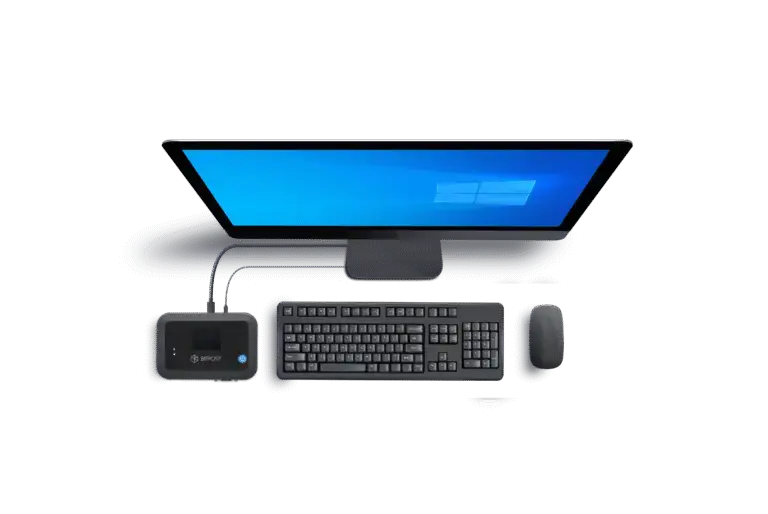
This section documents the capabilities, known scope limitations, and deployment considerations for each BifrostConnect component referenced in this guide.
Product Overview
| Product | Note |
|---|---|
| Bifrost Unit | Production hardware. Pen tested by Nixu, ICS Range, and Devoteam. Danish-manufactured. Deployed in critical infrastructure. |
| Direct Native Access | Browser-based WebRTC access (KVM, Serial, SSH). Clientless. |
| Direct Tunnel Access (DTA) | WireGuard-based IP tunneling via lightweight installed client application. Supports one-to-one, one-to-many, and many-to-one communication. Multiple operators can access the same endpoint in parallel. Port-forwarding not currently supported. |
| Bifrost Manager | Central management, audit logging, user/group/device policies. Available as shared cloud, dedicated cloud, or 100% on-premises deployment. |
| Direct Clientless Tunnel Access (DCTA) | Portable tunnel client requiring no installation or admin rights. Ad-hoc one-to-one access with attended access support. Port-forwarding capable. Platform-independent. |
| Clientless Tunnel Access (CTA) | Hardware-to-hardware encrypted tunnel between two Bifrost Units. IP and Serial tunnels. No software on either side. Port-forwarding capable. Designed for completely isolated environments. |
| AccessGuard | Station-level vendor access control for standalone Windows engineering stations (XP SP3 and later). Mandatory MFA, scoped application access, H.264 session recording. Core security architecture (mandatory MFA, localhost-only, DPAPI encryption) is architecturally fixed. |
| SessionGuard | Operator-side session recording for DTA, DNA, and DCTA sessions. Captures operator's screen and keystrokes. Requires customer-deployed recording server (WebRTC endpoint with storage). |
Hardware Unit Compatibility
BifrostConnect offers two hardware unit variants. The Attended Access Unit includes a built-in TOTP display requiring on-site staff to read and relay the code. The Unattended Access Unit does not include built-in TOTP but still requires two-factor authentication through the Bifrost Manager interface.
| Access Type | Attended Unit (TOTP) | Unattended Unit |
|---|---|---|
| DNA | Yes | Yes |
| DCTA | Yes | Yes |
| CTA | Yes | Yes |
| DTA | No | Yes |
Access Methods for Specialized Use Cases
While DTA and AccessGuard address the majority of scheduled vendor maintenance scenarios, certain operational situations require access methods that bypass the conventional network stack entirely. DNA addresses these with a key security property: the operator never joins the OT network.
- Commissioning and initial setup: New equipment (PLCs, RTUs, managed switches, protection relays) often requires BIOS configuration, firmware flashing, boot sequence changes, or initial IP assignment before a network stack is available. DNA provides direct BIOS-level access, KVM and serial console access through the Bifrost Unit.
- Incident response and recovery: When a system is compromised, unresponsive, or its network stack is down, conventional remote access tools cannot reach the device. DNA provides out-of-band console access through the Bifrost Unit’s independent connectivity (4G/satellite).
- Physical view-only enforcement: For scenarios requiring observation without interaction, DNA can be physically restricted to video-only mode by disconnecting the USB cable between the Bifrost Unit and the target equipment.
- Attended access (four-eyes principle): DNA and DCTA sessions are session- based with no persistent tunnel. On-site personnel initiate the session through Bifrost Manager, granting the remote vendor technician access for a defined scope and duration.
- Legacy and air-gapped equipment: Equipment that cannot run modern software agents is unreachable by conventional remote access tools. DNA’s KVM and serial access modes operate at the hardware interface level, providing remote access to any device with a physical console.
Known Scope Limitations
- Recording architecture - SessionGuard records operator-side sessions for DTA, DNA, and DCTA connections via screen capture and keystroke logging. AccessGuard independently records station-level activity (H.264) for DCTA, CTA, and DTA. When both are deployed, these provide dual-perspective recording: what the operator did (SessionGuard) and what happened on the endpoint (AccessGuard). Bifrost Manager provides session metadata (who, when, which unit, duration) for all access methods.
- AccessGuard requires network-based connectivity - AccessGuard operates via web browser over network (localhost:7531). It does not support non-network access methods.
- DTA client platform - The DTA client is available for macOS and Windows. DCTA removes platform dependency.
- DTA port-forwarding - Port-forwarding is not currently supported for DTA connections. DCTA and CTA support port-forwarding.
- Time-based access control - Scheduled, time-limited access windows are available through the Advanced access management plan in Bifrost Manager.
- DNA is latency-sensitive - DNA streams video via WebRTC, which makes it more sensitive to network latency than tunnel-based access methods.
- CTA requires hardware on both ends - Clientless Tunnel Access requires a Bifrost Unit connected to both the operator's machine and the target equipment.
- SessionGuard infrastructure requirement, enforcement, and verification - SessionGuard requires the customer to deploy a WebRTC recording server with storage on their own infrastructure. BifrostConnect does not store session content. Critically, the entity controlling the recording infrastructure must be organizationally independent from the vendor whose sessions are being recorded.
- SIEM integration and SSO - Available for customers on BifrostConnect Dedicated Cloud or on-premises infrastructure.
- SessionGuard records the operator's screen, not the endpoint - SessionGuard capture scope is configurable: application window only or full screen, set per policy in the Bifrost Manager.
- Session isolation requirement - When a vendor technician services multiple customers, each customer engagement must be isolated in a dedicated VM instance to ensure that session recordings, keystroke logs, and screen captures from one customer cannot be observed by or delivered to another customer.
Why Now?
NIS2 and the CER Directive shift enforcement from checklist compliance to forensic accountability. Beginning 2025, incidents at critical entities trigger an early warning to the competent authority within 24 hours (Art. 23(4)(a)), followed by a full incident notification within 72 hours (Art. 23(4)(b)). Organizations must demonstrate what was done, by whom, and for how long. Without session recordings and comprehensive logs, the answer to "What happened during the vendor session?" becomes "We don't know." This is unacceptable to regulators.
Supply chain accountability and zero-trust architecture are now regulatory requirements, not optional best practices. Remote access tooling must be built for forensic accountability, not convenience.

BifrostConnect's architecture implements Zero Trust at the access layer through three enforced outcomes:
- Verify explicitly: every session requires individual identity verification and MFA.
- Least privilege: access is scoped to specific endpoints, specific ports, and specific time windows.
- Assume breach: every session is recorded for forensic accountability.
These outcomes map to NIST SP 800-207's seven Zero Trust tenets: per-session access (Tenet 3), dynamic policy enforcement via Bifrost Manager (Tenet 4), encrypted communication regardless of network location via WireGuard or DTLS-SRTP (Tenet 2), and continuous security posture improvement through forensic session coverage (Tenet 7).
For Direct Native Access (DNA/KVM), the architecture extends beyond the network layer where classical ZTNA stops: the operator interacts through a video stream without joining the OT network, so there is no network-layer access to compromise.
For Direct Tunnel Access (DTA/WireGuard), session-scoped, IP-restricted tunnels provide tighter controls than traditional VPNs but do establish temporary network-layer connectivity for the duration of the session. Where Zero Trust tenets require capabilities beyond the access layer, such as continuous device posture assessment (Tenet 5) or OT protocol monitoring, BifrostConnect integrates with OT-IDS, NAC, and EDR platforms as documented in the Integration Compatibility Matrix.
The Two Variables
- Organization size determines available security infrastructure. Small OT (no AD, no servers, no SOC) vs. Large OT (dedicated security team, enterprise tools, jump servers).
- Software location determines who controls the execution environment, and therefore who owns the attack surface.
Find Your Scenario
| If you have… | And the vendor… | Then you are… |
|---|---|---|
| No AD, no servers, no SOC | Uses software on your station | Scenario 1 |
| AD, jump servers, SOC, SIEM | Uses software on your station | Scenario 2 |
| No AD, no servers, no SOC | Brings their own laptop to your OT | Scenario 3 (highest risk) |
| AD, jump servers, SOC, SIEM | Brings their own laptop to your OT | Scenario 4 |
Threat Model for 3rd Party Remote Access in OT
Threat Actors
| Threat Actor | Motivation | Capability | Relevant Scenario |
|---|---|---|---|
| Nation State | Strategic sabotage, destabilization, espionage | APT, multi-stage implants, supply chain access | All scenarios, especially 3 & 4 |
| Ransomware/Extortion Group | Financial extortion, operational disruption | Rapid lateral movement, encryption, data exfiltration | All scenarios; Scenarios 2 & 4 attractive |
| Compromised MSP/SI | Credential theft, malware staging | Legitimate remote access credentials | All scenarios; high impact |
| Malicious Insider | Data theft, sabotage, competitive intelligence | Direct OT network access | Scenarios 3 & 4 |
| Supply Chain (Compromised Software) | Payload delivery to multiple customers | Access to vendor development environment | Scenarios 3 & 4 |
Attack Vectors
| Attack Vector | Description | Prevention Strategy |
|---|---|---|
| Credential Reuse & Sharing | Shared admin password used across sessions | Individual accounts, mandatory MFA per session |
| Compromised Vendor Laptop | Malware on technician's PC; persistent foothold | Device attestation/NAC, micro-segmentation, OT-IDS |
| Malicious Firmware via Legitimate Tools | Trojanized firmware or malicious plugin | Vendor software supply chain integrity (SBOM) |
| Lateral Movement | Vendor gains network access; attacks other assets | Network micro-segmentation, OT-IDS |
| Emergency Access Bypass | Controls disabled at 2 AM, not re-enabled | Process automation, out-of-band access, audit logging |
Reference Incidents
| Incident | Year / Sector | Attack Vector | OT Impact | Relevant Lesson |
|---|---|---|---|---|
| Colonial Pipeline | 2021 / Oil & Gas | Compromised VPN credentials (no MFA) | Pipeline shutdown (6 days) | MFA enforcement on all remote access |
| Oldsmar Water (attribution disputed) | 2021 / Water | Unsecured TeamViewer, shared credentials | Unauthorized NaOH level change | Individual accounts, session monitoring |
| TRITON / TRISIS | 2017 / Petrochemical | APT targeting SIS via engineering workstation | SIS compromise, plant shutdown | Network micro-segmentation, OT-IDS |
| Danish Energy Sector | 2023 / Energy (DK) | Zyxel firewall vulnerabilities | 22 companies compromised | Out-of-band access, hardware-based access |
| Ukrainian Power Grid | 2015-2016 / Energy | Spear-phishing, VPN access to SCADA | 230,000+ customers without power | Ad-hoc access, session recording |
The Ad-Hoc Access Principle: Closed by Default
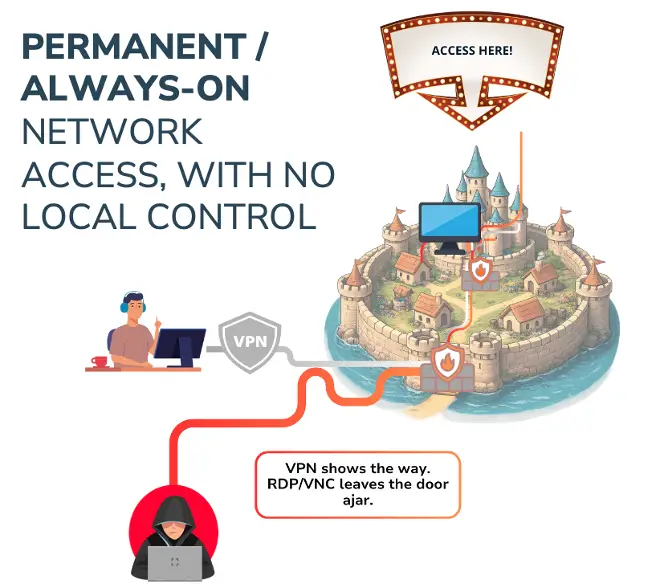
Traditional remote access (VPN, PAM, RDP) operates on an always-on model: connections are persistent, credentials are provisioned in advance, and the access path exists whether it is in use or not. This creates a permanent attack surface.
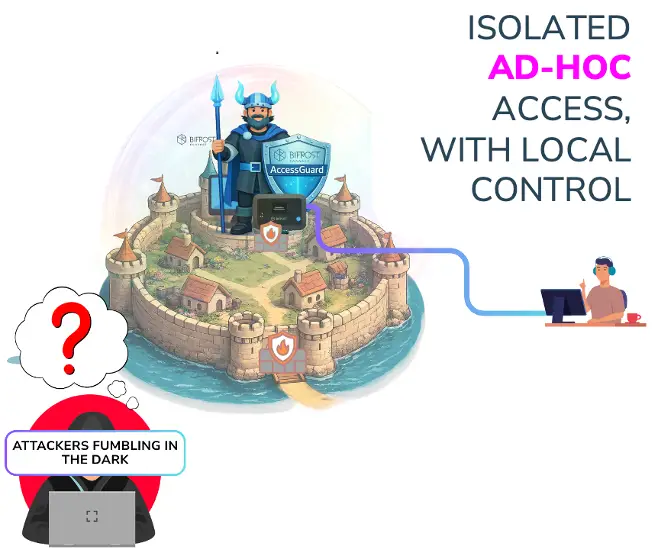
Ad-hoc access inverts this model. The connection does not exist until it is physically activated. When the session ends, the access path disappears.
- Ad-hoc access minimizes the persistent inbound attack surface associated with always-on VPN or RDP (the Bifrost Unit maintains a single outbound encrypted connection to Bifrost Manager; no inbound ports are open)
- Physical activation prevents unauthorized remote sessions
- Time-limited sessions ensure access automatically expires
- Per-session MFA and individual identity prevent credential reuse
- Automatic session termination reduces risk of emergency bypass becoming permanent
Scenario 1: Small OT: Software on Engineering Station
Profile
A water utility with 2 IT staff. PLC programming software (e.g., Siemens TIA Portal, ABB Ability) is installed and licensed on a standalone Windows engineering station at the plant. The station sits on an isolated OT network. A vendor needs to connect to this station to perform maintenance on a PLC.
Access Pattern
The vendor needs screen-level access to the engineering station to operate the programming software. They do not bring their own tools; they use what's installed on the customer's machine.
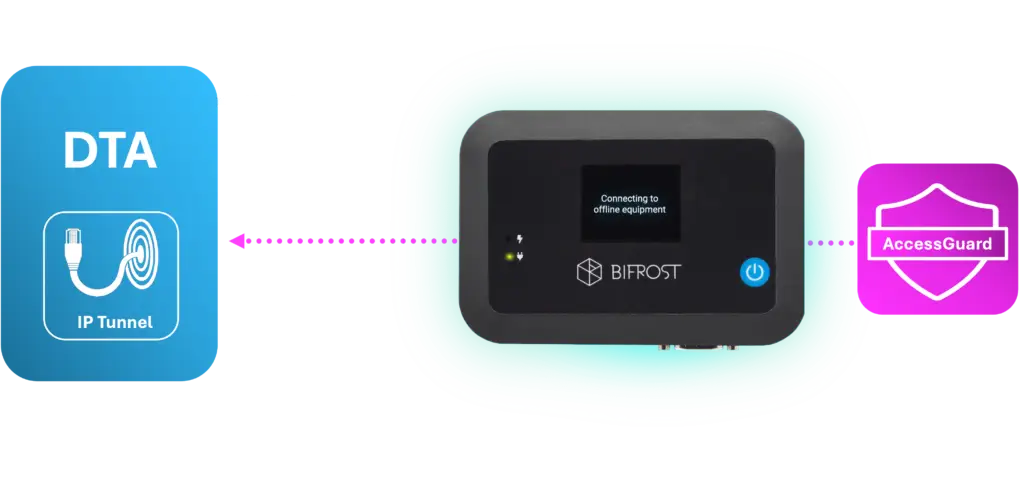
Current Reality (What Usually Happens)
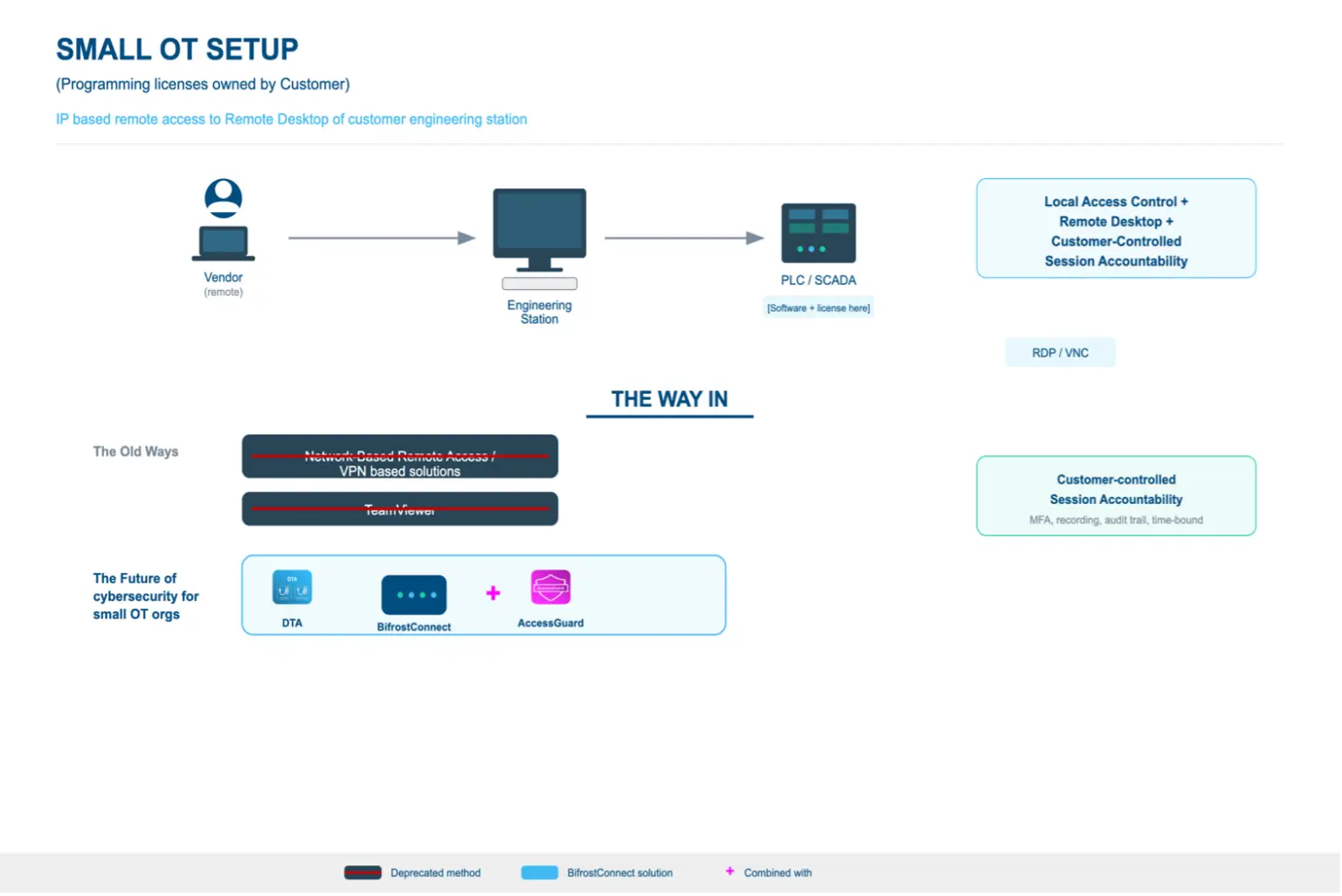
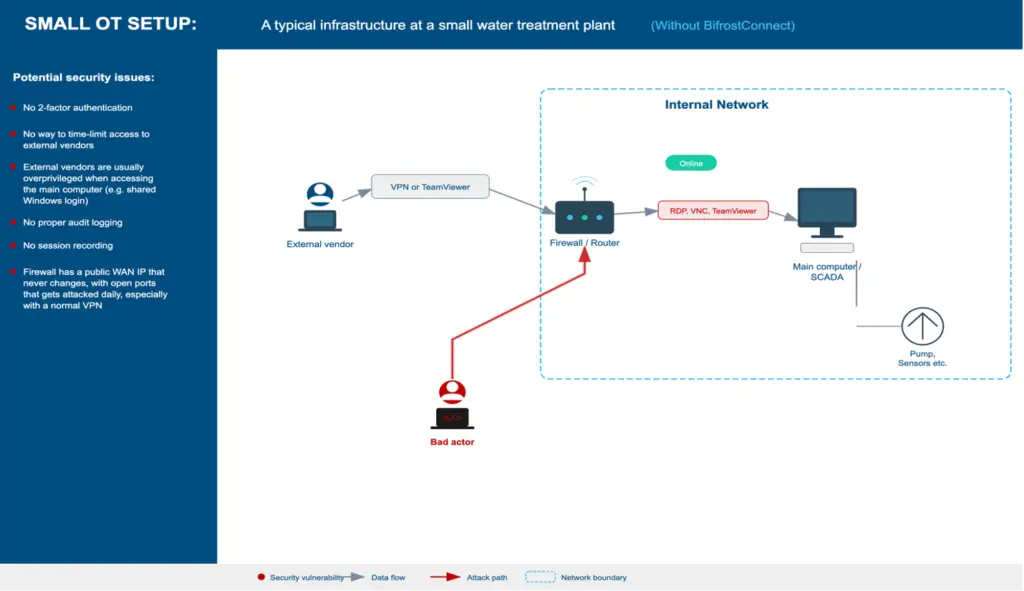
- Operations staff shares the admin password with the vendor over phone or email
- Vendor connects via TeamViewer, AnyDesk, or RDP, often through a temporary internet connection
- Vendor has full admin access to the station (and potentially the OT network)
- No one monitors the session. RDP single-session limitation means connecting would kick the vendor off
- No recording, no audit log, no forensic evidence of what happened
- When the session ends, the internet connection may or may not be disabled again
- If systems malfunction later, there is no forensic evidence
Best Practice Workflow
Pre-Access
- Individual vendor account created (not shared admin credentials). This binds every action to a named individual
- Access request documented with scope: which PLCs, which station, what maintenance task
- Time window defined and approved by operations lead
Authentication
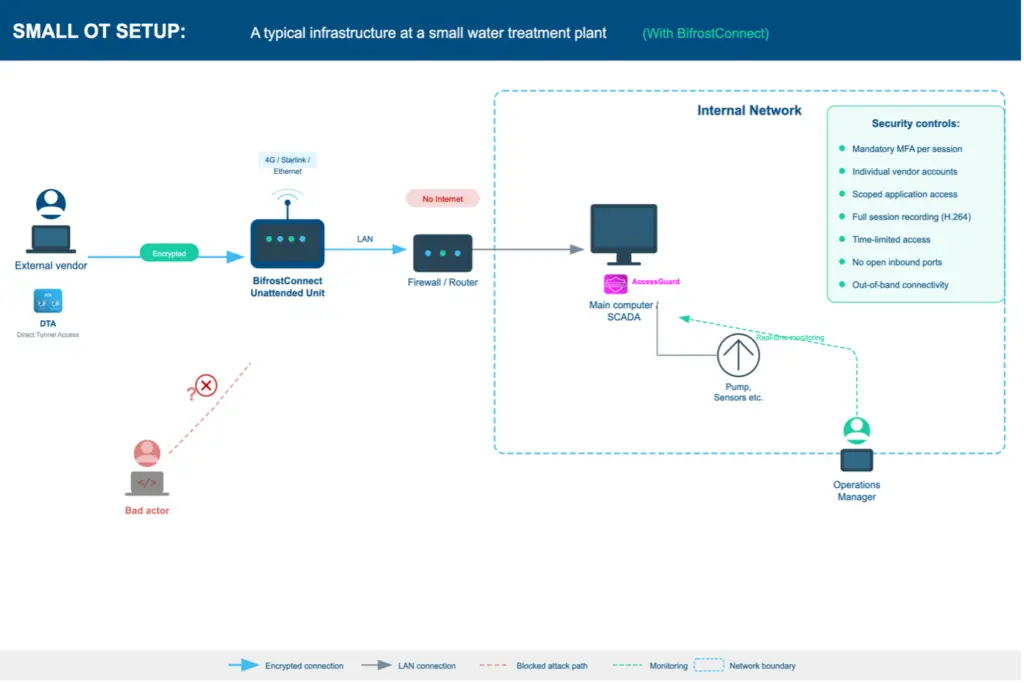
- Mandatory MFA per session (TOTP or equivalent). Not optional, not bypassable
- Individual credentials tied to the specific vendor technician
- Authentication works offline (no internet dependency on the engineering station)
Session
- Vendor accesses applications configured in the admin account without admin rights
- Operations staff can monitor the session in real-time without disconnecting the vendor
- Full video recording of the session runs automatically
- Event logging captures authentication, system access, configuration changes
- Access is scoped: vendor sees the applications they need, not the full admin desktop
Network Isolation
- The engineering station does not require direct internet connectivity. All remote access is brokered through the Bifrost Unit's outbound encrypted connection to Bifrost Manager
- Access delivered via local network, VPN to the facility, or out-of-band hardware
- Network segmentation preserved per IEC 62443 zone model throughout session
Post-Session
- Time-limited access expires automatically
- Session recording and logs stored locally on the OT network (no cloud dependency)
- Evidence available for incident investigation and compliance audit
Architecture
Before
After
Purdue Model: Best Practice Architecture
Recommended placement of access controls and monitoring within the ISA-95 / Purdue Enterprise Reference Architecture.
| Level | Zone | Components | BifrostConnect |
|---|---|---|---|
| L5 | Enterprise | Vendor (remote connection) | DTA |
| L3.5 | DMZ / OOB | Out-of-band access point | Bifrost Unit |
| L2 | Area Control | Engineering Station (TIA Portal, ABB Ability) | AccessGuard |
| L1 | Basic Control | PLCs, RTUs, Controllers | |
| L0 | Process | Sensors, Actuators, Field Devices |
Key Challenge
No AD, no server infrastructure, no security staff to manage policy. Security must be architectural (built into the tool) rather than administrative (requiring ongoing configuration and policy management).
Regulatory Alignment
- NIS2 Art. 21(2)(d): supply chain security
- NIS2 Art. 21(2)(i): access control policies for privileged access
- NIS2 Art. 21(2)(j): multi-factor authentication mandatory where appropriate
- Danish NIS2 Implementation Act §6: identity-bound access, MFA, time-limited sessions, logging
- IEC 62443-2-1: asset owner security program including supplier management
- IEC 62443-2-4: Section 5.5 to 5.9 requirements for access control and session logging
- BEK 260 §§51-56: remote access policies: identity, MFA, time-bound access
- BEK 260 §§65-68: logging and monitoring of network and information systems
- NCSC UK Secure Connectivity Principles: network segmentation integrity during remote access
Scenario 2: Large OT: Software on Engineering Station
Profile
A regional energy provider with a dedicated OT security team, Active Directory, centralized SIEM, and jump server infrastructure. PLC programming software is installed on managed engineering stations within a segmented OT zone. A vendor needs to connect to perform scheduled maintenance.
Access Pattern
Same fundamental access need as Scenario 1. The vendor must operate software on the customer's station, but the organization has infrastructure to implement layered controls.
Current Reality (What Usually Happens)
- Vendor account provisioned through IT ticketing system (often slow, taking days or weeks)
- Vendor connects via enterprise VPN to a jump server in a DMZ
- From jump server, RDP to the engineering station in the OT zone
- PAM solution (CyberArk, BeyondTrust) may manage credentials and record sessions
- Network segmentation via firewalls between IT, DMZ, and OT zones
- SIEM collects logs, but alert fatigue means anomalies may go unnoticed
- Process works but is heavy: vendor onboarding takes days, emergency access is slow
Best Practice Workflow
Pre-Access
- Formal vendor onboarding through identity management system
- Individual accounts provisioned in AD with role-based permissions
- Access request via change management workflow (ITSM ticket with approval chain)
- Defined maintenance window with scope and rollback plan
- Vendor contractual obligations documented (NDA, data handling, incident reporting)
Authentication
- MFA enforced at VPN, jump server, AND engineering station (defense in depth)
- Credential vaulting: vendor never sees the actual station password
- Just-in-time privilege elevation: admin rights granted for session duration only
- SSO integration with identity provider
Session
- PAM solution records full session (video + keystroke)
- Jump server provides network segmentation. Vendor cannot reach OT assets directly
- Firewall rules scoped to specific vendor → specific station → specific time window
- SOC monitors session in real-time via SIEM alerts
- Dual authorization for high-risk actions (e.g., firmware updates)
Network Isolation
- OT zone segmented per IEC 62443 zones and conduits model
- Jump server sits in a dedicated DMZ between IT and OT
- Engineering station not directly exposed to the internet; remote access brokered through Bifrost Unit
- Network access controls (NAC) validate session parameters
- Micro-segmentation limits lateral movement within the OT zone
- Unidirectional security gateways (data diodes) for monitoring traffic where applicable
Post-Session
- Access automatically revoked at session expiry
- Session recording archived in compliance repository
- Logs correlated in SIEM for anomaly detection
- Change verification: operations team confirms system state post-maintenance
- Formal sign-off closing the change management ticket
Architecture: Before vs. After
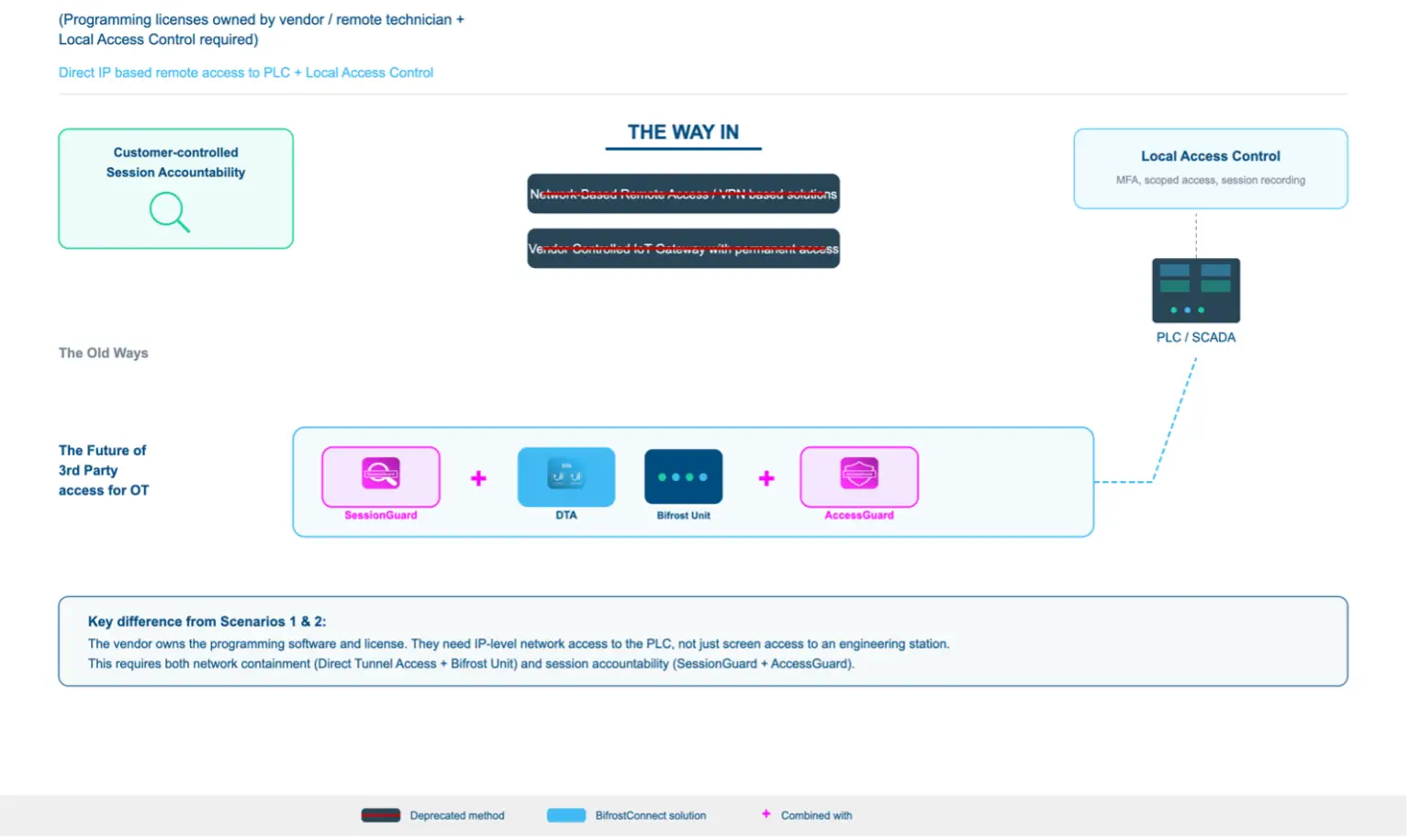
Purdue Model: Best Practice Architecture
Recommended placement of access controls and monitoring within the ISA-95 / Purdue Enterprise Reference Architecture.
| Level | Zone | Components | BifrostConnect |
|---|---|---|---|
| L5 | Enterprise | Vendor (remote connection) | DTA |
| L4 | Site Business | Corporate IT, Identity Provider, ITSM | |
| L3.5 | DMZ | Jump Server, Firewall, NAC | Bifrost Unit + DTA, Data Diode (partner) |
| L3 | Site Operations | Historian, SIEM, PAM | |
| L2 | Area Control | Engineering Station, SCADA, HMI | AccessGuard |
| L1 | Basic Control | PLCs, RTUs, Controllers | |
| L0 | Process | Sensors, Actuators, Field Devices |
Key Challenge
Complexity and speed. The infrastructure exists but the process is heavy. Emergency vendor access (e.g., a production system is down at 2 AM) often bypasses controls because the formal workflow takes too long.
Regulatory Alignment
- All Scenario 1 requirements, plus:
- NIS2 Art. 21(2)(b): incident handling: supports forensic investigation capability
- NIS2 Art. 21(2)(c): business continuity: access logs for disaster recovery verification
- NIS2 Art. 23: 24-hour incident reporting: session logs essential for scope determination
- BEK 260 §62: network segmentation between vendor access and production
- BEK 260 §§62-63: external vendor access: segmented network with documented controls
- BEK 260 §74: alternative communication required for incident response
- IEC 62443-3-3: system security requirements: zones, conduits, security levels
- ISO 27001: formal change management, access control, supplier management
Scenario 3: Small OT: Software on Technician PC (3rd Party)
Profile
A small water utility. The PLC vendor's technician has the programming software and license on their own laptop. They need network access to the customer's PLC to upload/download configurations, update firmware, or troubleshoot. The technician's laptop connects to the OT network to reach the PLC directly. This represents the highest proportional risk scenario for small OT organizations.
Access Pattern
This is fundamentally different from Scenarios 1 and 2. The vendor is not accessing the customer's station. They are bringing an uncontrolled device INTO the customer's OT network.
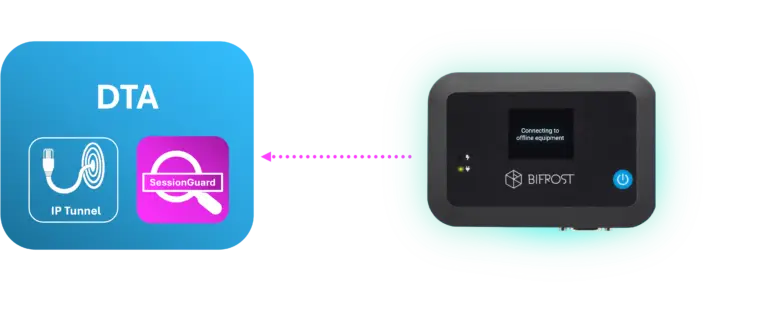
Current Reality (What Usually Happens)
- Vendor technician arrives on-site with a laptop
- Plugs directly into the OT network switch or engineering station port
- No validation of laptop security posture (patches, AV, USB history)
- Technician has direct IP access to PLCs, RTUs, HMIs on the network
- No segmentation. Once on the network, all OT assets are reachable
- No logging of what the technician did at the network or PLC level
- If done remotely: VPN or TeamViewer gives the technician's PC network-level access from outside
Best Practice Workflow
Pre-Access
- Vendor device security requirements contractually defined
- Vendor attestation of device compliance (self-certification or MDM verification)
- Specific PLC/device access scope defined: which IP addresses, which protocols, which actions
- Change request documented even for small orgs. At minimum, a logged email approval
Authentication
- Vendor authenticates to a gateway or access control point before reaching the OT network
- MFA required at gateway level
- Individual technician identity verified (not 'the Siemens account')
- Network access token is time-limited
Session
- Network-level access restricted to specific PLC IP addresses and ports only
- All traffic through the gateway is logged (source, destination, protocol, timestamp)
- If remote: vendor's PC connects through a controlled tunnel, not direct VPN to the OT subnet
- Ideally: vendor's traffic is proxied so the vendor PC never has direct L3 access to the OT network
- On-site: vendor connects through a managed port with VLAN isolation to the specific PLC
Network Isolation
- The vendor's PC should NEVER have broad access to the OT network
- Micro-segmentation or firewall rules limit access to the specific target device(s)
- If network-isolated: vendor connects on-site through a physically controlled access point
- If remote: out-of-band access that doesn't require OT network internet exposure
Post-Session
- Network access revoked immediately after session
- Gateway logs and any PLC audit logs preserved
- Operations team verifies PLC configuration state after vendor work
- Any firmware or configuration changes documented
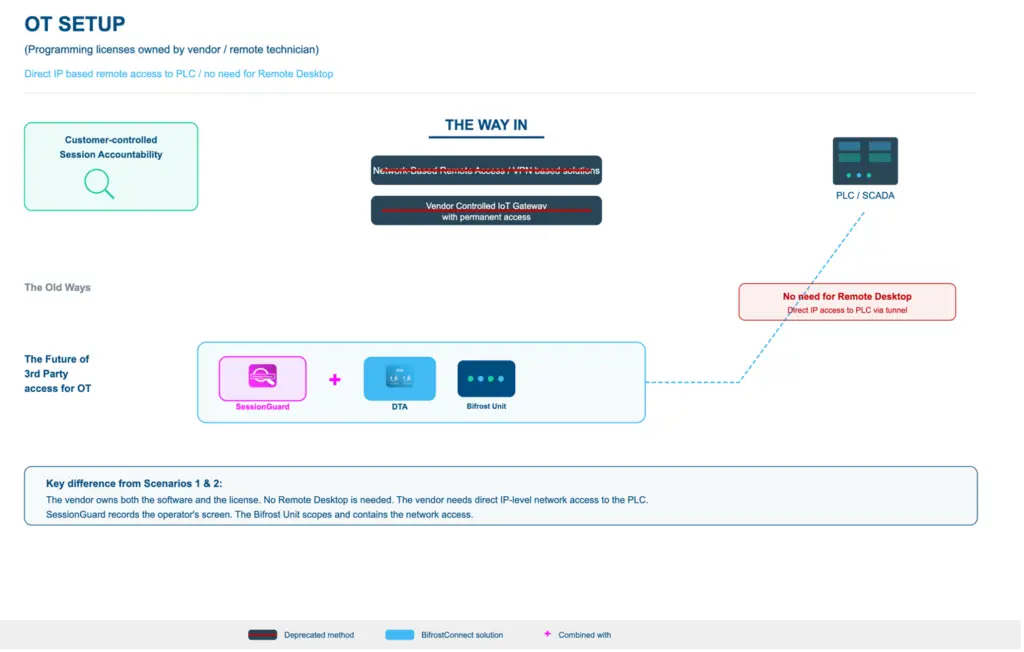
Purdue Model: Best Practice Architecture
Recommended placement of access controls and monitoring within the ISA-95 / Purdue Enterprise Reference Architecture.
| Level | Zone | Components | BifrostConnect |
|---|---|---|---|
| L5 | Enterprise | Vendor Technician PC (SW + license) | DTA + SessionGuard |
| L3.5 | DMZ / OOB | Out-of-band gateway, access control | Bifrost Unit |
| L2 | Area Control | Engineering Station, SCADA, HMI | |
| L1 | Basic Control | PLCs, RTUs, Controllers | |
| L0 | Process | Sensors, Actuators, Field Devices |
Key Challenge
The customer has no control over the vendor's device. They cannot inspect it, cannot guarantee it's clean, and cannot monitor what software runs on it. The best they can do is constrain what the device can reach on the network and log what it does.
Regulatory Alignment
- NIS2 Art. 21(2)(d): supply chain security: explicitly covers third-party service provider devices
- NIS2 Art. 21(2)(e): security in network systems maintenance
- NIS2 Art. 21(2)(i): access control must cover vendor device access to OT networks
- Danish NIS2 Implementation Act §6: vendor service access requires identity-bound, time-limited, fully auditable sessions
- IEC 62443-2-4: Section 5.5 to 5.9 requirements for technician access control
- IEC 62443-3-3: network segmentation per zone model when vendor PC connects to OT
- BEK 260 §§51-56: only authorized endpoints may access OT systems
- BEK 260 §§62-63: vendor access via segmented network with documented controls
- BEK 260 §§65-68: logging and monitoring requirements
- NCSC UK Secure Connectivity Principles: uncontrolled devices must not have broad OT network access
Scenario 4: Large OT: Software on Technician PC (3rd Party)
Profile
A large energy company with full OT security infrastructure. A vendor technician needs to connect their own laptop (with proprietary PLC programming software) to the OT network to maintain control systems. The organization has the infrastructure to implement comprehensive controls.
Access Pattern
Same risk as Scenario 3: an uncontrolled device connecting to the OT network. However, the organization can wrap it in layered controls.
Current Reality (What Usually Happens)
- Vendor onboarded through formal process (but emergency access often bypasses it)
- On-site: vendor laptop scanned at reception, connected to a guest/vendor VLAN
- Network access provisioned through NAC with limited scope
- Remote: vendor connects via VPN to a vendor-specific DMZ segment
- Firewall rules scope access to target PLCs, but rules are often overly broad
- PLC-level logging is limited (most PLCs have minimal audit capability)
- SOC may not have visibility into OT-specific protocols (Modbus, OPC UA, S7)
Best Practice Workflow
Pre-Access
- Vendor device compliance verified through endpoint assessment (NAC health check)
- Minimum requirements: current patches, active AV/EDR, disk encryption
- Device registered in vendor management platform with hardware fingerprint
- Access request through formal change management with OT-specific risk assessment
- Vendor staff individually vetted (background check for critical infrastructure access)
- Specific PLC models, firmware versions, and planned actions documented
Authentication
- MFA at VPN/network entry point
- NAC validates device posture before granting network access
- Credential vaulting for any OT credentials the vendor needs
- Individual identity (not shared vendor account)
- Just-in-time access provisioned for the maintenance window only
Session
- Vendor VLAN with micro-segmented access to specific PLC IP addresses only
- Deep packet inspection on OT protocols (if available): detect anomalous commands
- Network traffic recording at the firewall/IDS layer
- If on-site: physical escort or camera monitoring in sensitive areas
- If remote: vendor traffic proxied through an application-layer gateway where possible
- Dual-authorization for high-risk actions (firmware flash, safety system changes)
- SOC monitoring with OT-aware alerting (not just IT SIEM rules)
Network Isolation
- Dedicated vendor DMZ segment. Never direct access to OT production zone
- IEC 62443 zones and conduits model enforced through firewalls
- No internet access from the vendor segment to prevent data exfiltration
- Vendor PC cannot reach assets outside the defined scope
- Physical network isolation between vendor segment and safety systems (SIS)
- Unidirectional security gateways (data diodes) for monitoring traffic where applicable
Post-Session
- Network access revoked and firewall rules deactivated
- Full packet capture archived for forensic review
- PLC configuration backup compared pre/post maintenance (diff analysis)
- OT-IDS alerts reviewed for anomalous protocol behavior during session
- Formal change verification and sign-off
- Vendor device de-registered from NAC
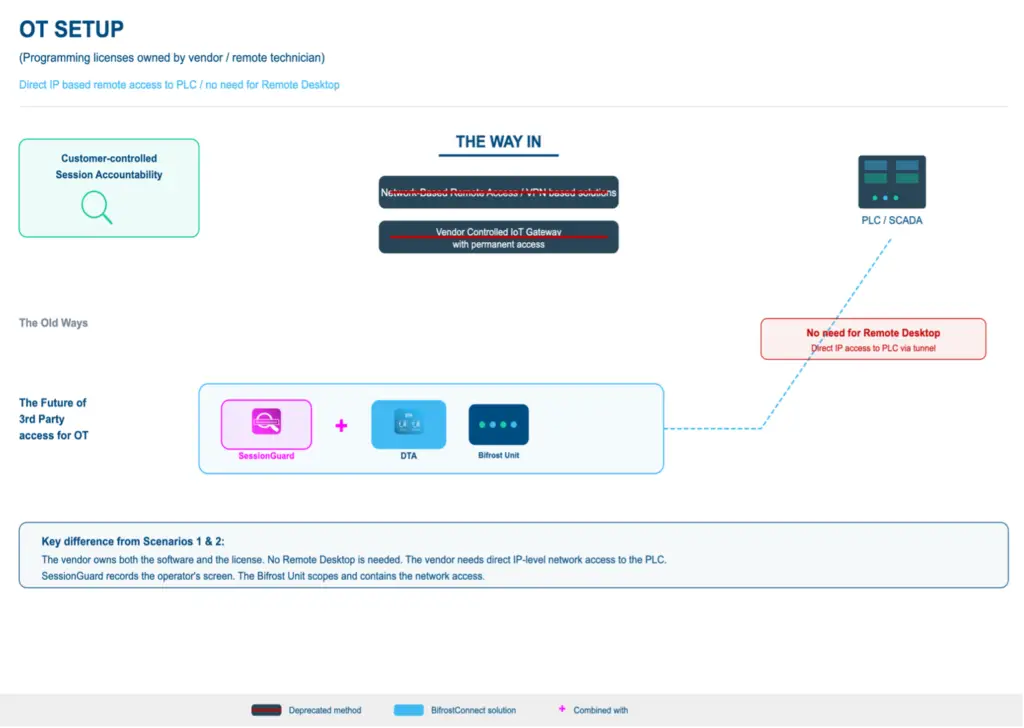
Purdue Model: Best Practice Architecture
Recommended placement of access controls and monitoring within the ISA-95 / Purdue Enterprise Reference Architecture.
| Level | Zone | Components | BifrostConnect |
|---|---|---|---|
| L5 | Enterprise | Vendor Technician PC (SW + license) | DTA + SessionGuard |
| L4 | Site Business | Corporate IT, Identity Provider, ITSM | |
| L3.5 | Vendor DMZ | Vendor VLAN, NAC, Firewall, IDS | Bifrost Unit, Data Diode (partner) |
| L3 | Site Operations | Historian, SIEM, OT-IDS, Recording Server | |
| L2 | Area Control | Engineering Station, SCADA, HMI | |
| L1 | Basic Control | PLCs, RTUs, Controllers | |
| L0 | Process | Sensors, Actuators, Field Devices |
Key Challenge
Even with enterprise infrastructure, the fundamental problem remains: the organization cannot fully control the vendor's device. NAC health checks verify patches and AV, but cannot detect sophisticated implants. The SolarWinds-style supply chain attack is extremely difficult to defend against. The second challenge is OT protocol visibility.
Regulatory Alignment
- All Scenario 3 requirements, plus:
- NIS2 Art. 21(2)(c): business continuity during vendor commissioning
- NIS2 Art. 23: incident reporting requires comprehensive session logs
- IEC 62443-3-3: SL-3/SL-4 requirements for zone isolation and communication control
- IEC 62443-2-4: Section 5.5 to 5.9 requirements for integration service provider access control
- IEC 62443-3-2: security risk assessment for system design including secure connectivity
- BEK 260 §62: mandatory network segmentation during vendor access
- BEK 260 §74: alternative communication channel required for fallback
- ISO 27001 Annex A.15: supplier relationships
- NIST SP 800-82: ICS security, remote access architecture
- CER Directive: cross-sector critical entity resilience including supply chain supervision
Comparative Summary
| Dimension | Scenario 1 Small / Station |
Scenario 2 Large / Station |
Scenario 3 Small / Vendor PC |
Scenario 4 Large / Vendor PC |
|---|---|---|---|---|
| License ownership | Customer owns | Customer owns | Vendor owns | Vendor owns |
| Execution environment | Customer station | Customer station | Vendor PC | Vendor PC |
| Primary recording tool | AccessGuard | AccessGuard | SessionGuard | SessionGuard |
| Primary risk | Shared credentials, no audit trail | Process overhead, emergency bypass | Uncontrolled device on OT network | Supply chain compromise, OT protocol blindness |
| Infrastructure | Standalone station, no AD | AD, jump servers, PAM, SIEM | Standalone, no segmentation | NAC, firewalls, IDS, vendor DMZ |
| Compliance feasibility | Difficult without purpose-built tooling | Achievable with enterprise stack | Very difficult: device control gap | Achievable but requires OT-specific tooling |
Integration Compatibility Matrix
BifrostConnect is designed to operate as the access governance layer within a broader OT security architecture.
| Scenario | BifrostConnect Covers | Ideal Integration Partners | Combined Outcome |
|---|---|---|---|
| Scenario 1 | Identity-bound access, MFA, session recording, audit trail | EDR/AV, security awareness training | Complete access governance + station-level protection for small OT |
| Scenario 2 | Rapid vendor onboarding, emergency access, station-level recording | OT-IDS (Claroty, Nozomi, Dragos), SIEM, PAM | Defence in depth from access layer to protocol layer |
| Scenario 3 | Scoped network access, MFA at gateway, session recording | Device attestation, NAC, vendor device security assessment | Access containment + device trust verification for small OT |
| Scenario 4 | Out-of-band access, session recording beyond PAM reach | OT-IDS with DPI, firmware integrity monitoring | Complete access governance + OT protocol intelligence |
The Structural Insight
Scenarios 1 & 2 (customer owns programming licenses): The challenge is access governance: who connects, what can they do, and can you document it. AccessGuard protects this environment with mandatory MFA, scoped application access, and H.264 session recording directly on the station.
Scenarios 3 & 4 (vendor owns programming licenses): The challenge is device trust. The vendor brings their own PC with their own licensed software and connects into the OT network. SessionGuard records the operator's screen during remote access sessions.
Why This Architecture Differs
Three questions expose the architectural difference: Where is the trust boundary? What is the attack surface when no session is active? Can the vendor move laterally beyond the defined scope?
- VPN-based remote access extends the corporate or vendor network into the OT zone. The tunnel is persistent, meaning the attack surface exists 24/7.
- ZTNA improves on VPN by brokering application-level access. However, it cannot reach endpoints that are offline, air-gapped, or lack a network stack.
- Jump hosts / bastion models provide network segmentation and a single audit point, but the jump host itself becomes a high-value target.
BifrostConnect’s hardware-enforced model places the trust boundary at a physical hardware device (the Bifrost Unit). The access path does not exist until a session is explicitly activated. In KVM/DNA mode, the operator never joins the OT network at all.
| Dimension | VPN | ZTNA | Jump Host | BifrostConnect |
|---|---|---|---|---|
| Trust boundary | Corporate perimeter Extends the network to the vendor. Once in, the vendor gets extensive IP access. Persistent credentials. | Identity + Context Brokers application-level access. Application-level brokering. Requires agent on endpoint. Reduced on VPN but still agent-based. | Bastion perimeter Single choke point (RDP, SSH). Requires AD, servers, PAM. Jump host is high-value target. No local access. Relies on infra. | Hardware device (Bifrost Unit) Physical trust boundary at the edge. No inbound ports. No agent. KVM: operator never joins network. Ad-hoc. No path exists between sessions. |
| Attack surface | Always-on tunnel Internet-exposed VPN appliance. Open ports. Persistent tunnel. CVEs in VPN appliances are primary attack vector. | Reduced but agent-dependent Scoped to applications. Requires software agent on endpoint. Agent becomes attack surface. | Single high-value target If compromised, attacker gains access to all connected systems. Persistent login sessions. Requires patching, hardening. | Ephemeral and scoped No open inbound ports. Outbound-only encrypted connection. Access path exists only during active session. Zero persistent surface. |
| Lateral movement | Broad network access Any host permitted by firewall rules. Rarely scoped to individual endpoints. Rules rarely pruned. | Scoped to applications Access limited to specific apps. But application compromise may allow lateral movement. Cannot reach air-gapped OT. | Single hop + persistence From jump host, RDP/SSH to any reachable host. Cached credentials on jump host. Persistent sessions common. | Scoped + ephemeral Access restricted to specific IPs and ports per session. No cached credentials. Path disappears when session ends. |
| RISK = | PERSISTENT | MODERATE + AGENT | SINGLE HOP + PERSISTENT | SCOPED + EPHEMERAL |
Architecture comparison for 3rd party OT remote access
Positioning in the OT Remote Access Landscape
- Industrial connectivity platforms: Provide the transport layer but do not inherently include the governance stack required by NIS2 and IEC 62443.
- Enterprise OT remote access platforms: Capable solutions for Scenario 2 and 4 organizations but require infrastructure that excludes the majority of OT sites in critical infrastructure sectors.
- Enterprise PAM platforms: Require Active Directory integration, jump-server infrastructure, and dedicated security staff. PAM operates at the IT/network layer and has no visibility into OT protocols.
Where BifrostConnect Fits in the Architecture
| Product | Primary Scenario Fit | What It Addresses | Ideal Integration Partners |
|---|---|---|---|
| AccessGuard | Scenarios 1, 2: station-level access control | MFA enforcement, H.264 recording, vendor account management, offline operation | EDR/AV, OT-IDS |
| Bifrost Unit + DTA | All scenarios: out-of-band access layer | OOB hardware access, end-to-end encryption, per-session MFA, time-bound access | SessionGuard, OT-IDS, NAC |
| Bifrost Unit + CTA | Scenarios 2, 4: completely isolated environments | Hardware-to-hardware encrypted tunnel. No software on either side. | AccessGuard, data diode |
| SessionGuard | Scenarios 3 & 4: operator-side recording | Screen recording via WebRTC for DTA, DNA, and DCTA sessions | Bifrost Unit, OT-IDS, NAC |
| Data Diode Partnership | Scenarios 2, 4: monitoring infrastructure | Hardware-enforced one-way data flow, secure file import with malware scanning | Bifrost Unit, AccessGuard or SessionGuard |
Positioning Summary
AccessGuard and the Bifrost Unit address the access governance layer: who connects, what can they do, and can you document it. SessionGuard extends this with operator-side session recording. When both are deployed, this creates dual-perspective forensic coverage. BifrostConnect addresses the access governance layer. Full NIS2 and IEC 62443 compliance requires additional organizational, contractual, and technical controls beyond any single access tool, including vendor vetting, incident response procedures, network segmentation, and endpoint integrity measures.
Integration with OT-IDS and Deep Packet Inspection
BifrostConnect provides the access governance and forensic accountability layer for remote access sessions. OT-specific intrusion detection systems (IDS) provide the protocol intelligence layer. Together, they deliver complete visibility from access control to OT command level.
The Bifrost Unit generates comprehensive audit logs of every session: authentication events, access grants/denials, session start/stop times, and per-session metrics. These logs export to SIEM platforms via RFC 5424 syslog.
OT-IDS platforms (Claroty, Nozomi Networks, Dragos) add the next layer: monitoring actual Modbus TCP, OPC UA, S7comm, and DNP3 protocol traffic. They detect anomalous commands. When correlated with BifrostConnect session logs and recordings, this creates a forensic chain: who accessed the system (BifrostConnect), what they did on screen (SessionGuard), and what OT commands were executed (OT-IDS).
Compliance Maturity Matrix
The matrix below maps key remote access requirements against three maturity levels: what NIS2/IEC 62443 explicitly requires, what constitutes best practice beyond minimum compliance, and what cannot currently be solved by technology alone.
| Requirement Area | Regulatory Minimum (Required) | Best Practice (Beyond Compliance) | Unsolvable by Technology |
|---|---|---|---|
| Identity & Authentication | MFA for all remote access. Individual accounts. [NIS2 Art. 21(2)(j)] | Hardware tokens, FIDO2. Continuous re-authentication. | Compromised vendor personnel. Social engineering bypassing MFA. |
| Session Logging & Audit | Auditable events for all access: who, when, what, duration. [NIS2 Art. 21(2)(a)] | Video session recording. Keystroke logging. Immutable log storage. | Interpreting vendor intent from recordings without OT domain expertise. |
| Supply Chain Security | Documented vendor access policies. Risk assessment. [NIS2 Art. 21(2)(d)] | Vendor security posture assessment. Automated lifecycle. | Vendor internal security culture. Sub-contractor chains. |
| Network Segmentation | Zone and conduit model. DMZ between IT and OT. [IEC 62443-3-2] | Micro-segmentation. Data diodes. Out-of-band access. | Legacy OT devices that cannot participate in segmented architectures. |
| Incident Response | 24h early warning, 72h notification. [NIS2 Art. 23] | Automated session correlation with OT-IDS alerts. | Attribution of state-sponsored attacks. Zero-day exploits. |
| Access Time Bounding | Time-limited access. No persistent connections. [IEC 62443-3-3 SR 1.5] | Automatic session expiry. Calendar-based access windows. | Emergency access conflicting with approval workflows. |
| Endpoint Integrity | Access devices meet minimum security standards. [IEC 62443-2-4] | Device posture checks before session start. Dedicated VMs per customer. | Vendor device compliance when vendor owns the PC. Rootkits. |
The 'Unsolvable by Technology' column identifies residual risks that require procedural, contractual, or organizational mitigations.
Sources and References
All regulatory and standards references cited in this document. Retrieval date: March 2026.
EU Directives
- Directive (EU) 2022/2555 (NIS2 Directive), OJ L 333, 27.12.2022. Key sections: Art. 21(2)(a)-(j), Art. 23 incident reporting.
- Directive (EU) 2022/2557 (CER Directive), OJ L 333, 27.12.2022. Art. 13 risk assessments, Art. 14 resilience measures.
Danish National Legislation
- Act No. 434 of 6 May 2025 (Danish NIS2 Implementation Act, NIS 2-loven). Entered into force 1 July 2025.
- Executive Order No. 260 of 6 March 2025 (BEK 260). Key sections: §§51-56 remote access, §77 incident reporting.
- Styrelsen for Samfundssikkerhed (SAMSIK), Vejledning til NIS 2-loven, 1. udgave, juni til august 2025.
International Standards
- IEC 62443 series. Key parts: IEC 62443-2-1, IEC 62443-2-4, IEC 62443-3-2, IEC 62443-3-3.
- ISO/IEC 27001:2022. Annex A controls: A.5.15, A.5.19-5.22, A.8.2, A.8.5, A.8.15-8.16.
- NIST SP 800-82 Rev. 3, Guide to Operational Technology (OT) Security, September 2023.
National Guidance
- NCSC UK, Secure Connectivity Principles for Operational Technology, January 2026.
- ENISA, Good Practices for Security of IoT and OT, 2023.
Threat Intelligence and Incident Sources
- MITRE ATT&CK for ICS. Techniques: T0859, T0886, T0862, T0831.
- CISA ICS-CERT Advisories: Colonial Pipeline (AA21-131A), Oldsmar (AA21-042A), TRITON (MAR-17-352-01).
- SektorCERT, Threat Assessment: The Danish Energy Sector, November 2023.
- Dragos Year in Review, 2023 and 2024 editions.
Appendix: Security Architecture Overview
Summary of BifrostConnect security architecture as of March 2026, based on published security documentation (Version 2.2.2).
| Component | Description |
|---|---|
| Cryptographic Architecture | End-to-end encryption using TLS 1.2/1.3 in transit. WireGuard (Curve25519, ChaCha20, Poly1305) for Direct Tunnel Access. DTLS-SRTP (WebRTC standard) for Direct Native Access and SessionGuard. |
| Key Management | WireGuard private keys generated locally on each device, never transmitted. AccessGuard uses Windows DPAPI (OS-managed AES-256 encryption). WebRTC DTLS encryption negotiated directly between peers. |
| Firmware Update Process | Bifrost Unit firmware managed exclusively through dedicated Bifrost Manager. Units retain policies even after hardware reset. No local web interface. |
| Secure Development Lifecycle | Penetration testing by Nixu, ICS Range, and Devoteam. Code review and threat modeling in development. |
| Supply Chain Transparency | Hardware manufactured in Denmark. SBOM available on request. |
| Session Recording Storage | Customer-controlled storage on customer infrastructure. No cloud dependency, no vendor access to recording data. |
| Compliance Certifications | BifrostConnect pen tested by Nixu, ICS Range, and Devoteam. Documentation available under NDA upon request. |
Disclaimer
This document presents best practice recommendations based on the regulatory and standards framework as of March 2026. It does not constitute legal advice. Organizations should verify applicability to their specific regulatory context with qualified legal and compliance counsel.
Footnotes
[1] Directive (EU) 2022/2555 of the European Parliament and of the Council of 14 December 2022 (NIS2 Directive), OJ L 333, 27.12.2022. Retrieved March 2026.
[2] Act No. 434 of 6 May 2025 on measures to ensure a high level of cybersecurity (Danish NIS2 Implementation Act, NIS 2-loven). Entered into force 1 July 2025. Retrieved March 2026.
[3] IEC 62443 series, International Electrotechnical Commission. Referenced standards: IEC 62443-2-1 (asset owner), IEC 62443-2-4 (service providers), IEC 62443-3-2 (risk assessment), IEC 62443-3-3 (system security requirements). Retrieved March 2026.
[4] Executive Order No. 260 of 6 March 2025 on preparedness in the electricity sector (BEK 260), Danish Ministry of Climate, Energy and Utilities. Retrieved March 2026.
[5] NCSC UK, Secure Connectivity Principles for Operational Technology, January 2026. Retrieved March 2026.
[6] ISO/IEC 27001:2022, Information security, cybersecurity and privacy protection. Information security management systems. Requirements. Retrieved March 2026.
[7] NIST SP 800-82 Rev. 3, Guide to Operational Technology (OT) Security, September 2023. National Institute of Standards and Technology. Retrieved March 2026.
[8] Directive (EU) 2022/2557 of the European Parliament and of the Council of 14 December 2022 on the resilience of critical entities (CER Directive), OJ L 333, 27.12.2022. Retrieved March 2026.