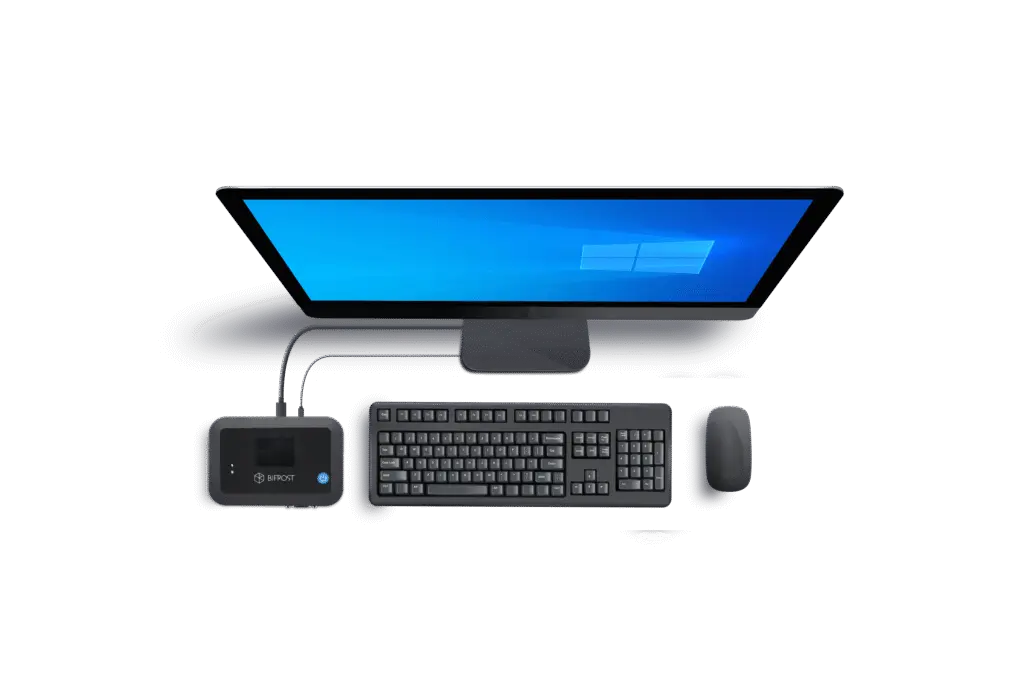



No open ports.
No local software.
No hassle.
BifrostConnect is a hardware-based solution, that bridges the gap between IT, OT and 3rd Party Services teams.
It's Zero Trust by design, requires no software installation on the target device, and gives you secure, auditable access even to air-gapped and legacy systems. All without changing your network.
What is BifrostConnect?
No local software installs. open ports. hassle.
BifrostConnect is a hardware-based solution, that bridges the gap between IT, OT and 3rd Party Services teams. It's Zero Trust by design, requires no software installation on the target device, and gives you secure, auditable access even to air-gapped and legacy systems. All without changing your network.
What is BifrostConnect?
Hardware Based Unified Out-of-Band Access
Whenever you require an immediate connection to critical equipment, BifrostConnect facilitates on-the-spot Remote Access, perfectly suited for third-party access situations in both
IT and OT fields.
- Portable
- Battery driven
- Out-of-Band
- Zero Trust
- Plug-and-play
- Hardware-based
Hardware Based Unified Out-of-Band Access
Whenever you require an immediate connection to critical equipment, BifrostConnect facilitates on-the-spot Remote Access, perfectly suited for third-party access situations in both
IT and OT fields.
- Portable
- Battery driven
- Agentless
- Out-of-band
- Easy to use
- Zero Trust
- Just-in-time
- Air-gapped
- Plug-and-play
Built on Zero Trust principles
Our approach is built on the principles of least privilege, enforced through granular policies. By combining hardware and cybersecurity, BifrostConnect provides an additional layer of protection to safeguard your high-value assets.
- Zero Trust Management
- Zero Unit Configuration
- Zero Internet Exposure
- Zero Network Compromise
Built on Zero Trust principles
Our approach is built on the principles of least privilege, enforced through granular policies. By combining hardware and cybersecurity, BifrostConnect provides an additional layer of protection to safeguard your high-value assets.
- Zero Trust Management
- Zero Unit Configuration
- Zero Software Installs
- Zero Internet Exposure
- Zero Network Compromise
BifrostConnect's 5 Z approach
1. Zero Trust Management
BifrostConnect enables your organization to assign a dedicated administrator to define security and access management policies. By emphasizing just-in-time access and granular policy enforcement, BifrostConnect ensures precise access control to specific endpoints and applications.
Access management can seamlessly integrate with your organization’s existing Identity and Access Management (IAM) solution. Additionally, BifrostConnect provides audit logging for tracking usage and monitoring events. These logs can be integrated into your organization’s Security Information and Event Management (SIEM) systems for efficient and streamlined security management.
2. Zero Unit Configuration
Your BifrostConnect solution is dedicated and pre-configured for your organization, allowing Bifrost Units to be shipped directly and installed at the desired location or endpoint. These units provide secure remote access immediately, enabling plug-and-play implementation by nontechnical personnel.
To ensure maximum security, Bifrost Units retain access and security policies even after a hardware reset. Your organization’s security policies are managed exclusively through your dedicated Bifrost Manager, and Bifrost Units cannot be accessed or configured via a local web interface, ensuring the integrity of your BifrostConnect solution.
3. Zero Software Installs
The deployment of the BifrostConnect Solution requires no software installation on endpoints , facilitating a seamless integration process. The user can control where endpoint data is processed, depending on the type of session connection. This flexibility allows for on-premises data processing or data communication between endpoints if permitted.
4. Zero Internet Exposure Bifrost
Units utilize internet connections either in-band or via the integrated out-of-band LTE connection. Crucially, these units do not share the internet connection with the endpoints during a Remote Access Session, ensuring secure and undisturbed communication channels.
5. Zero Network Compromise
Advancing on Zero Trust Network Access (ZTNA) principles, BifrostConnect decouples application access from network access. This reduces your attack surfaces, inhibits lateral movement, and ensures that access to endpoints and applications is exclusively granted to authorized users, eliminating implicit trust.
The solution effectively renders endpoints and network infrastructure invisible to unauthorized users by leveraging inside-out connections from the Bifrost Unit to the user. IP addresses remain hidden from unauthorized users and the internet, ensuring your network remains secure and inaccessible.
Learn more about our security documentation on this page:
BifrostConnect Security Documentation
BifrostConnect's 5 Z approach
1. Zero Trust Management
BifrostConnect enables your organization to assign a dedicated administrator to define security and access management policies. By emphasizing just-in-time access and granular policy enforcement, BifrostConnect ensures precise access control to specific endpoints and applications.
Access management can seamlessly integrate with your organization’s existing Identity and Access Management (IAM) solution. Additionally, BifrostConnect provides audit logging for tracking usage and monitoring events. These logs can be integrated into your organization’s Security Information and Event Management (SIEM) systems for efficient and streamlined security management.
2. Zero Unit Configuration
Your BifrostConnect solution is dedicated and pre-configured for your organization, allowing Bifrost Units to be shipped directly and installed at the desired location or endpoint. These units provide secure remote access immediately, enabling plug-and-play implementation by nontechnical personnel.
To ensure maximum security, Bifrost Units retain access and security policies even after a hardware reset. Your organization’s security policies are managed exclusively through your dedicated Bifrost Manager, and Bifrost Units cannot be accessed or configured via a local web interface, ensuring the integrity of your BifrostConnect solution.
3. Zero Software Installs
The deployment of the BifrostConnect Solution requires no software installation on endpoints , facilitating a seamless integration process. The user can control where endpoint data is processed, depending on the type of session connection. This flexibility allows for on-premises data processing or data communication between endpoints if permitted.
4. Zero Internet Exposure Bifrost
Units utilize internet connections either in-band or via the integrated out-of-band LTE connection. Crucially, these units do not share the internet connection with the endpoints during a Remote Access Session, ensuring secure and undisturbed communication channels.
5. Zero Network Compromise
Advancing on Zero Trust Network Access (ZTNA) principles, BifrostConnect decouples application access from network access. This reduces your attack surfaces, inhibits lateral movement, and ensures that access to endpoints and applications is exclusively granted to authorized users, eliminating implicit trust.
The solution effectively renders endpoints and network infrastructure invisible to unauthorized users by leveraging inside-out connections from the Bifrost Unit to the user. IP addresses remain hidden from unauthorized users and the internet, ensuring your network remains secure and inaccessible.
Just-in-time Access to Critical Systems, without exposing everything else?
You probably already have a big PAM solution, self-built VPN setups, and five different remote tools deployed by your vendors – all running at once.
And sure, they help keep uptime high… until the day they don’t.
And yes, of course your suppliers and service providers have policies and guidelines to ensure your data security and compliance under the latest fancy certifications.
BUT… People will be people.
They get distracted. They make mistakes.They forget to close tunnels. They postpone password updates.
And it only takes a minute.
In a world of Zero Trust and always-on operations – how do you enable just-in-time access to critical systems, without exposing everything else?
Just-in-time Access to Critical Systems, without exposing everything else?
You probably already have a big PAM solution, self-built VPN setups, and five different remote tools deployed by your vendors – all running at once.
And sure, they help keep uptime high… until the day they don’t.
And yes, of course your suppliers and service providers have policies and guidelines to ensure your data security and compliance under the latest fancy certifications.
BUT… People will be people.
They get distracted. They make mistakes.They forget to close tunnels. They postpone password updates.
And it only takes a minute.
In a world of Zero Trust and always-on operations – how do you enable just-in-time access to critical systems, without exposing everything else?
Works Where Others Can't
That’s where the unified all-in-one BifrostConnect technology comes in.
It’s not just another remote access tool.
It’s a Remote Anchor Point for your virtual bridge – a secure, physical point of contact that gives you remote access to your most isolated, problematic, even unreachable systems.
No open ports. No standing VPNs. No exposure to the internet.
Whether you need to:
- Access the BIOS on a failed server
- Run licensed software against a PLC
- Tunnel into a SCADA interface
- Troubleshoot a switch that’s not even on the network yet
- Or solve one of the dozens of edge-cases where your existing setup either can’t – or shouldn’t provide access…
BifrostConnect UOA™ makes it possible – all in one hardware-based portable solution.
Works Where Others Can't
That’s where the unified all-in-one BifrostConnect technology comes in.
It’s not just another remote access tool.
It’s a Remote Anchor Point for your virtual bridge – a secure, physical point of contact that gives you remote access to your most isolated, problematic, even unreachable systems.
No local software installs. No open VPNs. No changes to your network.
Whether you need to:
- Access the BIOS on a failed server
- Run licensed software against a PLC
- Tunnel into a SCADA interface
- Troubleshoot a switch that’s not even on the network yet
- Or solve one of the dozens of edge-cases where your existing setup either can’t – or shouldn’t provide access…
BifrostConnect UOA™ makes it possible – all in one hardware-based portable solution.
BifrostConnect
Unified Out-of-Band Access™ (UOA)
BifrostConnect unifies two complementary access modes into a single secure platform that gives you:
- Device-level and network-level access in one solution
Secure connections to offline, segmented, or isolated systems
Audited, compliant sessions that never expose your equipment on the internet.
- A dream-tool helping you both with preventing cybersecurity incidents, as well as supporting you with faster recovery and fallback connectivity , if it happens.
UOA makes remote access work the way OT demands it: resilient, secure, and designed for critical operations.
Device-level and network-level access in one solution
Secure connections to offline, segmented, or isolated systems
Audited, compliant sessions that never touch the production network
| Remote Access Types | Direct Native Access | Clientless Tunnel Access | Direct Tunnel Access |
|---|---|---|---|
| Access Methods | KVM, Serial Terminal, SSH | IP, Serial | IP |
| Security & Control Coverage | |||
| Secure TransportEncrypted connection into the OT environment | Built-in = full KVM, Serial Terminal, and SSH control directly in the browser | Built-in | |
| Native Endpoint ControlDirect interaction with equipment (screen, keyboard, mouse, terminal) | Built-in = full KVM, Serial Terminal, and SSH control directly in the browser | When combined with AccessGuard provides remote desktop (browser-based local access with MFA and scoped application control) | |
| Session Accountability & Audit | |||
| Session AccountabilityProof of what happened: screen recording, keystroke logging, audit trail | Bifrost Manager audit log + SessionGuard operator-side screen recording and keystroke logging. | Bifrost Manager audit log + AccessGuard endpoint-side recording (H.264), local MFA, and scoped application access. | Bifrost Manager audit log + SessionGuard operator-side screen recording and keystroke logging. Add AccessGuard for dual-perspective forensic coverage (operator-side + endpoint-side recording). |
| Technical Description | |||
| What It Is | Browser-based hardware-level console access via WebRTC. Single Bifrost Unit connected to target equipment. No software installation on either side. | Hardware-to-hardware encrypted tunnel between two Bifrost Units. No software on either side. Pure hardware security boundary. | WireGuard-based IP tunnel via lightweight installed client application, connecting to a Bifrost Unit in the OT environment. Subnet mappings enable access to multiple endpoints, as well as enabling multiple operators/technicians to access the same endpoint in parallel. |
| Authorization | |||
| Authorization Methods |
Attended
Built-in TOTP in physical Bifrost unit, requiring on-site staff supervision. Unattended
Does not require on-site staff / no built-in TOTP in the hardware — still 2-factor when initiating access through Bifrost remote session interface. |
Unattended Does not require on-site staff / no built-in TOTP in the hardware — still 2-factor when initiating access through Bifrost remote session interface. |
|
| Advantages & Limitations | |||
| NB / Advantages & Limitations |
+ No software installations required + BIOS access + Out-of-the-box configuration (endpoint) + Production data stays on-prem + Physical view-only enforcement by removing USB cable + AD-HOC usability is very high – One-2-one access only – Requires video, mouse and keyboard I/O – Latency sensitive |
+ No software installations required / air-gapped tunnel + Extremely secure + Port-forwarding – One-2-one access only – Requires a Bifrost hardware unit in both ends – AD-HOC usability is medium to low due to dedicated hardware in both ends |
+ Time-based access if combined with Advanced Access Management Plan + One-2-one communication + One-2-many communication + Many-2-one communication + AD-HOC usability is high, after setting up subnet mapping and access rules in Manager – Currently no port-forwarding |
| Physical Installation | |||
| Physical Installation | Plugged directly into the equipment you need to control (e.g. computer, PC, tablet, smart screen, etc.) |
If the remote technician possesses the engineering licenses on their technician PC, then the Bifrost unit is plugged directly into the target equipment (e.g. PLC) or the same closed network. If the customer possesses the engineering licenses on-prem on an on-site engineering station or Virtual Machine license pool, then the Bifrost unit is connected to that or the same closed network. |
|
| Recommended Use Cases | |||
| The Best Option For | When you need native access and local control of the equipment, and/or you want physical assurance that no data leaves the premises, e.g. during: – Commissioning new equipment or sites (even installing a PC from remote) – Troubleshooting, rebooting or reinstalling operating systems – Incident response & recovery |
When you need IP or Serial based communication between the remote technician computer and the endpoint, and aren't allowed to install software neither client or agent side, AND the technician computer is not allowed to be online, e.g. when: – You need to use the software on the remote operator computer to interact with the endpoint – Or want to reach a remote desktop application on an engineering station or similar |
When you need IP based communication between the remote technician computer and the endpoint, and ARE allowed to install software on client side, the technician computer IS allowed to be online, and you need multi-user parallel access, e.g. when: – You need to use the software on the remote operator computer to interact with the endpoint – Or want to reach a remote desktop application on an engineering station or similar |
Built-in TOTP in physical Bifrost unit, requiring on-site staff supervision.
Does not require on-site staff — still 2-factor through Bifrost remote session interface.
+ BIOS access
+ Out-of-the-box configuration (endpoint)
+ Production data stays on-prem
+ Physical view-only enforcement by removing USB cable
+ AD-HOC usability is very high
– One-2-one access only
– Requires video, mouse and keyboard I/O
– Latency sensitive
– Commissioning new equipment or sites (even installing a PC from remote)
– Troubleshooting, rebooting or reinstalling operating systems
– Incident response & recovery
Built-in TOTP in physical Bifrost unit, requiring on-site staff supervision.
Does not require on-site staff — still 2-factor through Bifrost remote session interface.
+ Extremely secure
+ Port-forwarding
– One-2-one access only
– Requires a Bifrost hardware unit in both ends
– AD-HOC usability is medium to low due to dedicated hardware in both ends
If the customer possesses the engineering licenses on-prem, the Bifrost unit is connected to the on-site engineering station or the same closed network.
– You need to use the software on the remote operator computer to interact with the endpoint
– Or want to reach a remote desktop application on an engineering station or similar
Does not require on-site staff / no built-in TOTP in the hardware — still 2-factor when initiating access through Bifrost remote session interface.
+ One-2-one communication
+ One-2-many communication
+ Many-2-one communication
+ AD-HOC usability is high, after setting up subnet mapping and access rules in Manager
– Currently no port-forwarding
If the customer possesses the engineering licenses on-prem, the Bifrost unit is connected to the on-site engineering station or the same closed network.
– You need to use the software on the remote operator computer to interact with the endpoint
– Or want to reach a remote desktop application on an engineering station or similar