BifrostConnect Security Documentation
Zero Trust Principles
Whether you require clientless or client-based remote access, BifrostConnect offers a secure solution for accessing private endpoints and applications. Our approach is built on the principles of least privilege, enforced through granular policies. By combining hardware and cybersecurity, BifrostConnect provides an additional layer of protection to safeguard your high-value assets.
BifrostConnect's 5 Z approach
1. Zero Trust Management
BifrostConnect enables your organization to assign a dedicated administrator to define security and access management policies. By emphasizing just-in-time access and granular policy enforcement, BifrostConnect ensures precise access control to specific endpoints and applications.
Access management can seamlessly integrate with your organization’s existing Identity and Access Management (IAM) solution. Additionally, BifrostConnect provides audit logging for tracking usage and monitoring events. These logs can be integrated into your organization’s Security Information and Event Management (SIEM) systems for efficient and streamlined security management.
2. Zero Unit Configuration
Your BifrostConnect solution is dedicated and pre-configured for your organization, allowing Bifrost Units to be shipped directly and installed at the desired location or endpoint. These units provide secure remote access immediately, enabling plug-and-play implementation by nontechnical personnel.
To ensure maximum security, Bifrost Units retain access and security policies even after a hardware reset. Your organization’s security policies are managed exclusively through your dedicated Bifrost Manager, and Bifrost Units cannot be accessed or configured via a local web interface, ensuring the integrity of your BifrostConnect solution.
3. Zero Software Installs
The deployment of the BifrostConnect Solution requires no software installation on endpoints , facilitating a seamless integration process. The user can control where endpoint data is processed, depending on the type of session connection. This flexibility allows for on-premises data processing or data communication between endpoints if permitted.
4. Zero Internet Exposure Bifrost
Units utilize internet connections either in-band or via the integrated out-of-band LTE connection. Crucially, these units do not share the internet connection with the endpoints during a Remote Access Session, ensuring secure and undisturbed communication channels.
5. Zero Network Compromise
Advancing on Zero Trust Network Access (ZTNA) principles, BifrostConnect decouples application access from network access. This reduces your attack surfaces, inhibits lateral movement, and ensures that access to endpoints and applications is exclusively granted to authorized users, eliminating implicit trust.
The solution effectively renders endpoints and network infrastructure invisible to unauthorized users by leveraging inside-out connections from the Bifrost Unit to the user. IP addresses remain hidden from unauthorized users and the internet, ensuring your network remains secure and inaccessible.
Under the hood
BifrostConnect is a hardware-based remote access solution (“BifrostConnect Solution”) that allows secure remote access without installing software on the endpoints .The solution enables access to IT and OT equipment and devices, including but not limited to computers, PLCs, mobile phones, IoT devices, and network equipment.
The BifrostConnect Solution consists of the following components:
- The Bifrost Unit is a compact remote-control unit that relays actions based on the operated remote access type.
- The Services provide authentication, a web-based remote access interface, identity and access management, audit logging, and API integrations (E.g. SIEM or SSO).
- The optional Software Clients for using Direct IP Tunnels and USB Tunnels.
The BifrostConnect Solution enables secure (i) remote access to, (ii) remote control of, and/or (iii) remote connection between IT & OT equipment (each a “Remote Device”). Remote access is controlled via the BifrostConnect Manager, depending on the remote access type. The web client can also activate a relay remotely, typically used for remote reboot operations.
Technology Overview
- BifrostConnect Service: Currently hosted on DigitalOcean using Docker containers.
- Web-Based Authentication: Implemented with Auth0, which complies with multiple data privacy and security standards, including ISO 27001/27018, SOC 2 Type 2, and CSA STAR certifications .
- End-to-End Encrypted Data Sessions: For Direct Native Access, sessions are secured over WebRTC, utilizing TURN servers. These servers can be customer-hosted for added control. For the Direct Tunnel Access, WireGuard technology is used along with TURN servers, while a P2P connection can be established using STUN technology.
- Secure Messaging: Messages are end-to-end encrypted over MQTT using secure WebSockets (wss), with a custom authentication layer enhancing security.
- HTTPS (TLS): All web clients and web-facing endpoints are secured with HTTPS, ensuring data integrity and privacy.
- Clients (optional):
- A Direct Tunnel client enabling Direct IP Tunnels, leveraging a peer-to-peer overlay network based on WireGuard®.
- A VirtualHere USB Client4 , enabling USB Tunnelling.
Remote Access Types
The solution offers the following Remote Access types:
Direct Tunnel Access (with client)
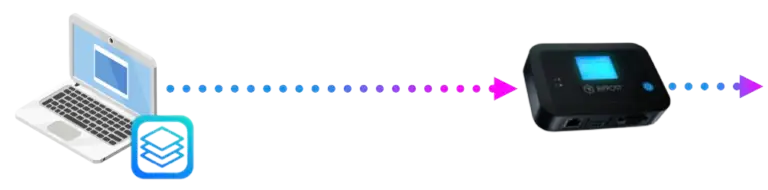
Description: Establish a secure tunnel between a computer and one or more Bifrost Units, relaying access to your target endpoint(s).
Methodology: Remote operators install a lightweight client on their computer or mobile device, which manages access and enforces permissions configured by the administrator in the BifrostConnect Manager. Target endpoints are connected to a Bifrost Unit, eliminating the need for a client on the endpoint.
Purpose: This setup allows remote operators to use applications on their own devices to communicate with and control the target endpoint(s) efficiently and securely.
Direct IP Tunnel: Identity-based IPv4 connectivity to endpoints linked to Bifrost Unit(s). Access is managed through Subnet Mappings, which associate users with specific endpoint IPs or subnets.
Direct Native Access (Clientless In-Browser Access)
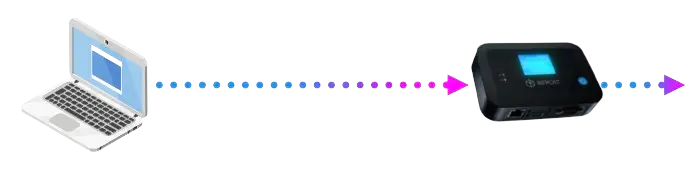
Description: Gain remote, physical-level control of a device and process data locally as if you were physically present at the endpoint.
Methodology: A remote operator establishes a single user session to the endpoint through a browser-based remote access interface that communicates with an on-site Bifrost Unit, relaying commands and graphical user interfaces. Remote access sessions are End-to-End encrypted based on Web Real-Time Communication (WebRTC), and all traffic is relayed through a TURN server.
Purpose: This setup provides the remote operator with native access to the endpoint while ensuring that data is processed and kept locally on the endpoint during the remote session.
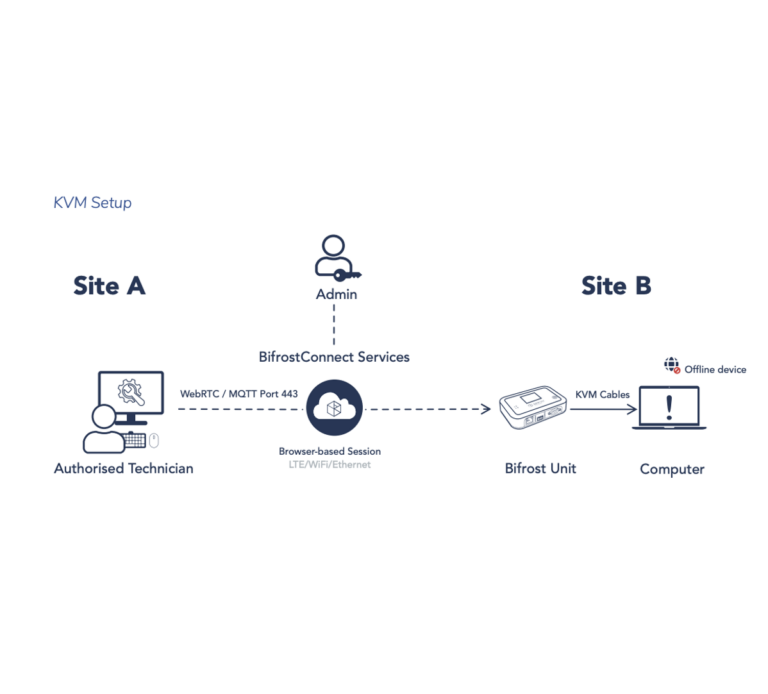
KVM Access: Provides keyboard, video, and mouse (KVM) control of endpoints, enabling hands-on operation even during the boot-up process. In addition to Bifrost Access Management policies, access control complies with the endpoint’s local authentication and access control settings. For added flexibility, KVM Access can be limited to video-only viewing by connecting only the video cable between the Bifrost Unit and the endpoint.
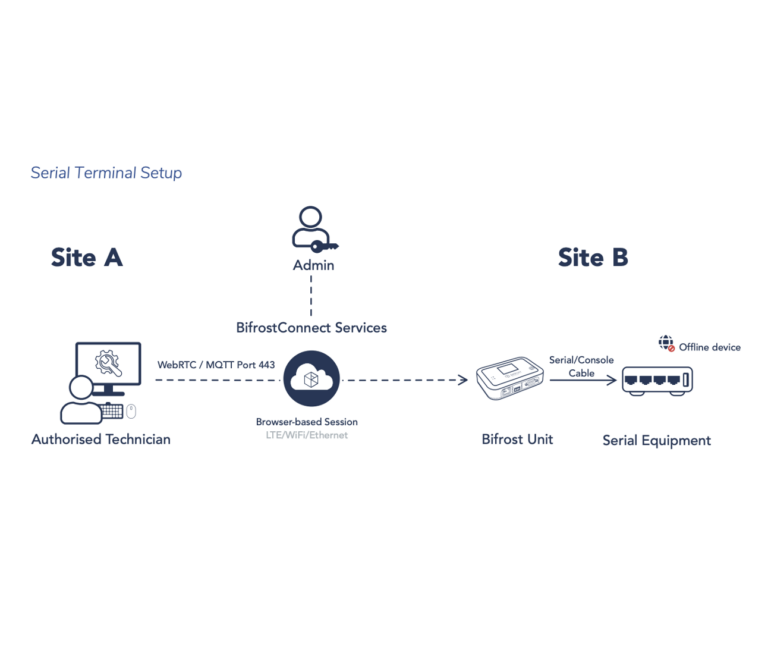
Serial Terminal: Provides console access via an RS232 serial connection to an onpremises terminal, enabling out-of-band access to network equipment, computers, and industrial devices. In addition to Bifrost Access Management policies, access is protected by a login prompt if required by the endpoint.
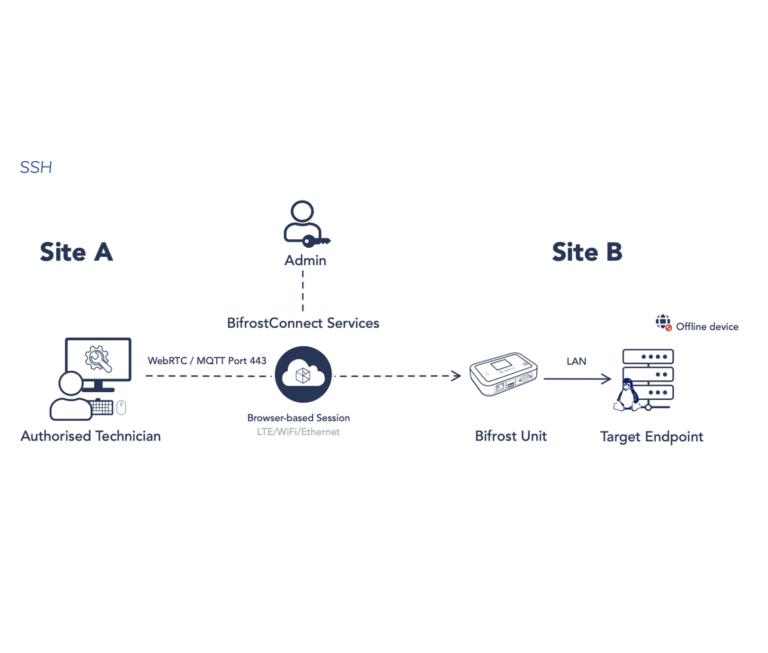
SSH: Provides terminal access to endpoints through the Secure Shell Protocol (SSH), enabling a command-line interface for management and control. In addition to Bifrost Access Management policies, access is secured with the endpoint’s local username and password authentication, and the design inherently prevents port scanning of the endpoint from the Bifrost Interface.
Bifrost-to-Bifrost Tunneling
Clientless Tunneling
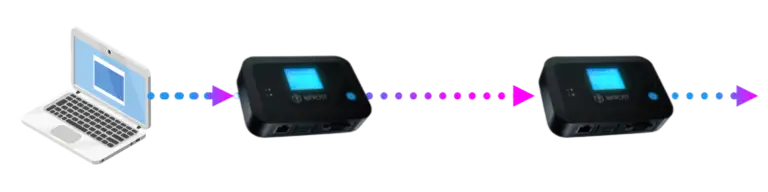
Description: Establish a tunnel between two Bifrost Units, relaying access to your target endpoint(s).
Methodology: Remote operators connect a Bifrost Unit to their computer, eliminating the need to install a client. Similarly, target endpoints are linked to a Bifrost Unit, removing the requirement for a client on the endpoint. Sessions can only be initiated by authorized users or administrators with the necessary permissions. Once a session is initiated, all individuals with access to the operator’s Bifrost Unit can utilize the connection by connecting to the unit.
Purpose: This setup allows remote operators to use applications on their own devices to communicate with and control the target endpoint(s) efficiently and securely. The Bifrost Tunnel enables file transfer between two offline devices.
IP Tunnel: Provides clientless IP communication between remote devices without the need for VPN tunneling. A Bifrost IP Tunnel establishes an end-to-end encrypted connection between two Bifrost Units, creating point-to-point tunnels on a persession, on-demand basis. Authorized users or administrators must specify the IP addresses and ports enabled for remote access in each remote session.
Serial Tunnel: Provides clientless serial (RS232) communication between remote devices. A Bifrost Serial Tunnel establishes an end-to-end encrypted connection between two Bifrost Units, creating point-to-point tunnels on a per-session, ondemand basis.
Other Tunnels
USB Tunnel: Provides USB communication between remote devices. A Bifrost USB Tunnel establishes an end-to-end encrypted connection between two Bifrost Units, enabling USB emulation through point-to-point tunnels on a per-session, on-demand basis. Sessions can only be initiated by authorized users or administrators.
Methodology: Remote operators connect a Bifrost Unit to their computer and install a software client to communicate with a USB server on the Bifrost Unit at the endpoint. Target endpoints are connected to a Bifrost Unit, eliminating the need for a client on the endpoint. Sessions can only be initiated by authorized users or administrators with the required permissions. Once a session is initiated, all individuals with access to the operator’s Bifrost Unit can utilize the connection by connecting to the unit.
Purpose: This setup allows remote operators to use applications on their own devices to communicate with and control the target endpoint(s) efficiently and securely. While technically possible, transferring files between two offline endpoints over the internet is not recommended due to latency issues.
File transfer
Direct File Transfer: Provides, clientless file transfer using a browser-based interface to connect to a Bifrost Unit. Files can be uploaded to the Bifrost’s internal storage and later accessed locally via a file service protocol over a LAN cable or by using the Bifrost as a USB key. Additionally, remote operators can retrieve files from the Bifrost Unit. Access to the internal storage can be configured as read-only.
Methodology: Files can be transferred to and from a Bifrost Unit whether or not it is connected to an endpoint, allowing for physical access control between the remote operator and the endpoint. Remote transfers between the Bifrost Unit and the target endpoint can be accomplished by combining the transfer with a KVM Access session. Direct File Transfers can only be initiated by authorized users or administrators.
Purpose: This setup enables remote operators to transfer or retrieve files while ensuring local control and management of the file transfer on-site.
Offline File Transfer: Provides, clientless file transfer to offline devices without exposing endpoints to the internet. A Bifrost Tunnel establishes an end-to-end encrypted connection between two Bifrost Units, enabling SFTP-based file transfers to and from a Bifrost Unit. Files can be uploaded to the Bifrost’s internal storage and later accessed locally via a file service protocol over a LAN cable or by using the Bifrost as a USB key. Additionally, remote operators can retrieve files from the Bifrost Unit.
Methodology: Remote operators connect a Bifrost Unit to their computer, eliminating the need to install a client. Files can be transferred to and from a Bifrost Unit whether it is connected to an endpoint, allowing for physical access control between the remote operator and the endpoint. Remote transfers between the Bifrost Unit and the target endpoint can be accomplished by combining the transfer with a KVM Access session. Offline File Transfers can only be initiated by authorized users or administrators and the SFTP protocol enforces Password protection on for read and write actions.
Purpose: This setup enables remote operators to transfer or retrieve files using their prefered SFTP tool while ensuring local control and management of the file transfer on-site. The Bifrost Tunnel enables file transfer between two offline devices
Remote Access Technologies
The Bifrost Solution supports two distinct remote access methods, each leveraging different underlying technologies to provide secure connectivity for authorized users:
- WireGuard-Based Remote Access
This access type uses WireGuard to establish permanent or time-based point-to-point VPN tunnels. These encrypted tunnels enable direct communication between endpoints and are accessible only by authorized users for the defined lifespan of the tunnel. - Session-Based Remote Access
This access type utilizes browser-based WebRTC technology to initiate session-based remote access. These sessions are temporary and persist only while the browser session remains active. Access is restricted to authorized users, and no persistent network tunnel is created.
WireGuard-based Remote Access
WireGuard is a modern VPN protocol designed for high performance and security. It utilizes state of-the-art cryptographic principles5 and is known for its simplicity, minimal attack surface, and efficient performance compared to traditional VPN solutions.
How Bifrost Direct Tunnels Differ from Traditional VPNs
BifrostConnect Direct Tunnels uses the open-source platform Netbird as a key component for WireGuard-based tunneling. Netbird leverages WireGuard to establish secure, encrypted tunnels between machines, ensuring confidentiality, integrity, and network traffic authentication.
| Use Case | Traditional VPN | Bifrost Direct Tunnel |
|---|---|---|
| Your need to enable static access to an entire remote network | ✅ Designed for broad network access | ❌ Scoped to specific endpoints and subnets |
| You need secure access to legacy infrastructure not exposed to the internet | ❌ Often requires public-facing configuration | ✅ Ideal for legacy systems behind firewalls or air-gapped networks |
| You want remote access without exposing the operator’s PC to the remote network | ❌ Exposes PC to the remote network | ✅ Operator’s PC stays isolated |
| You need to prevent lateral movement across customer or vendor networks | ❌ Inter-device communication is possible | ✅ Unsolicited inbound traffic is blocked |
| You require strict access control | ❌ Hard to enforce least privilege | ✅ Centrally managed least privilege |
| You operate in a sensitive or regulated environment (e.g., NIS2, GxP, MDR) | ❌ Limited control and logging | ✅ Comprehensive logging and policy enforcement |
| You want a modern, secure tunneling protocol | ❌ Often relies on legacy VPN protocols | ✅ Built on WireGuard® via Netbird |
| You need to separate vendor and customer infrastructure completely | ❌ Potential for network bridging | ✅ Full separation via Bifrost routing and masquerading |
Traditional VPN Limitations
In traditional VPN configurations, a remote operator’s PC becomes part of the endpoint’s local network and receives an internal IP address. This setup grants broad access to the local network, exposing the operator’s PC to all devices within that environment. It also allows devices on the network to initiate connections back to the operator’s PC, which increases the risk of lateral movement, data exposure, and potential malware propagation through open ports.
Suppose the operator’s PC is also connected to a network, e.g., a vendor’s corporate network. In that case, this exposure can bridge both environments, posing a risk to internal systems within the vendor’s infrastructure.
BifrostConnect Direct Tunnel Advantages
BifrostConnect’s Direct Tunnel approach avoids these risks by isolating the remote operator’s PC from the end-customer’s network. The operator’s PC does not receive a local IP address, nor is it directly exposed to the on-site network.
Instead, the Bifrost Unit acts as a secure intermediary between the remote operator and the endpoint, either by routing traffic through a connected jump station or directly to the target device. In both cases, the Bifrost Unit enforces physical masquerading, ensuring that only its IP address is visible on the network. The operator’s PC remains separated and unreachable from other devices.
Only authorized operator-initiated connections are permitted. The Bifrost Unit applies stateful routing, allowing return traffic only in response to the operator’s requests. Unsolicited inbound traffic is blocked by default, significantly reducing the risk of unauthorized access or lateral movement.
Access control is centrally managed via the Bifrost Manager, applying least privilege principles and policy-based restrictions to limit access to specific users, devices, and timeframes
Secure, Targeted Connectivity Without VPN Overhead
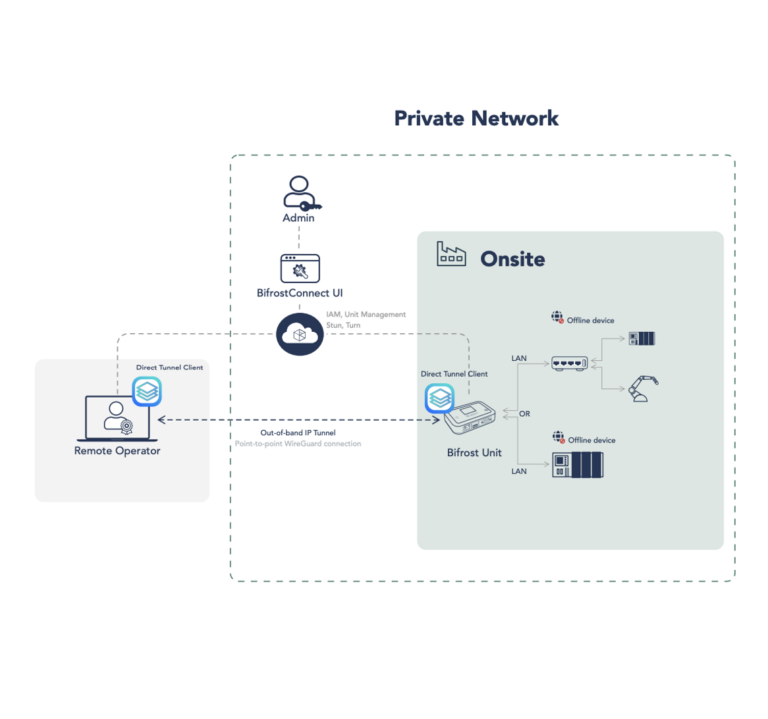
Combining Bifrost and NetBird technologies enables a fast and secure peer-to-peer network with end-to-end encryption. This setup facilitates direct IP communication (when permitted by firewall rules; otherwise, traffic is relayed) between devices running the Direct Tunnel Client and those connected to a Bifrost Unit. Endpoints are never exposed to the public internet during Direct IP Tunneling.
This approach is especially valuable in environments where installing VPN clients on endpoints is not feasible or allowed. It minimizes network exposure by removing the need to grant access to entire LANs or corporate networks, thereby decreasing the attack surface and enhancing overall security posture.
The Direct Tunnel Components
Direct Tunnel has four key components that work together to establish secure, encrypted peer-topeer connections without relying on traditional VPN servers or gateways. These components enable authenticated access, decentralized networking, and efficient connectivity between devices and endpoints connected to Bifrost Units.
1. Direct Tunnel Client Application (Agent)
The Direct Tunnel Client application (or agent) is installed on devices (peers), such as a remote operator’s computer, to facilitate peer-to-peer communication within the network. It enables devices to join BifrostConnect networks, authenticate users, and establish encrypted WireGuard tunnels for direct connections to endpoints routed via Bifrost Units.
The Direct Tunnel Client application performs the following functions:
- Key Generation and Distribution: Generates private and public WireGuard keys for encryption and Cryptokey Routing. Public keys are sent to the Management service, which then distributes them to authorized peers to establish secure connections.
- Registration and Authentication: User peers and routing Bifrost Units must authenticate using BifrostConnects Auth0 Identity Provider (IDP) or a setup key to ensure association with the correct organization.
- Network Configuration Updates: Receives and applies initial configurations, including peer lists, public keys, and assigned IP addresses, to facilitate direct peer-to-peer connections.
- Connection Establishment: Uses the Signal Service to discover and negotiate the best connection candidate (IP:port) before establishing an encrypted WireGuard tunnel. This process ensures optimal routing and avoids relays if possible.
- Access Control Policy Enforcement: Implements access control rules received from the Management service by integrating with system-level firewall managers.
The private key generated by the Direct Tunnel Client application never leaves the machine, ensuring that only the device that owns the key can decrypt incoming traffic.
2. Management Service
The Management Service handles User peer registration, Bifrost Unit routing peer registration, access control enforcement, and network configuration. It communicates directly with the BifrostConnect Manager to ensure that only authorized users and devices can participate in the network.
Key functions of the Management Service include:
- Distributing public keys to authorized peers for secure encrypted communication.
- Managing peer authentication and registration within an organization.
- Applying and enforcing access control policies at the network level.
- Providing configuration updates to clients, including peer lists and routing information.
NetBird monitors various metrics, including:
- Peer WAN IP addresses and routing Bifrost Units
- Network Interfaces (IP, MAC address)
- Peer metadata
- OS version
- Kernel version o Processor architecture
- Wireguard Version
- Machine information (Serial number, Product Model)
- Events (The full list of tracked events can be found here: https://docs.netbird.io/howto/audit-events-logging)
Note: All data is stored within the BifrostConnect infrastructure and is never shared with third parties (no telemetry is shared with NetBird). Tunnel usage is protected by WireGuard encryption, and all traffic is transient and not stored.
3. Signal Service
The Signal Service is a lightweight signaling mechanism that helps peers discover and establish direct connections. It does not store data or route traffic but acts as a notification system to facilitate connection negotiation.
Key functions of the Signal Service include:
- Peer Discovery: Enables user peers and Bifrost Units to find each other and exchange connection candidates (IP:port) required for direct communication or a relay if required.
- Encrypted Signaling: All messages sent through the Signal Service are point-to-point encrypted, ensuring confidentiality.
The NetBird Signal Service is similar to WebRTC signaling servers.
4. Relay Service
The Relay Service functions as a fallback mechanism when direct peer-to-peer connections are not possible. It operates as a TURN (Traversal Using Relays around NAT) server, using opensource TURN-server implementations to relay encrypted traffic between peers.
Key aspects of the Relay Service include:
- Fallback Routing: Ensures connectivity in restricted network environments by relaying traffic over port 443 when direct connections fail.
- End-to-End Encryption: Traffic remains encrypted with WireGuard, meaning the Relay Service cannot decrypt or inspect the data it transmits.
- Cloud or Self-Hosted Deployment: BifrostConnects Dedicated Cloud Customers can choose to use BifrostConnects managed relay service or deploy their own for enhanced control.
NAT traversal techniques minimize the need for complex firewall or network configurations. Each device independently verifies and accepts only trusted connections using WireGuard’s CryptoKey Routing, ensuring a secure and efficient network architecture.
For more detailed technical information on:
- NetBird Architecture: https://docs.netbird.io/about-netbird/how-netbird-works
- WireGuard: https://www.wireguard.com/papers/wireguard.pdf
Session-based Remote Access
Session Management
To ensure security and prevent impersonation of clients and Bifrost Units, the BifrostConnect solution employs robust access control measures. Each web client and Bifrost Unit is provided with a unique namespace for identification. A record of paired web clients and Bifrost Units is created by the BifrostConnect session manager, which precludes a Bifrost Unit from establishing connections with multiple web clients. Regular status messages are exchanged between web clients and Bifrost Units. Sessions are cleanly terminated through disconnect messages or, in the absence of status messages over a certain period, the service will terminate the session. WebRTC interaction occurs exclusively between the web client and the Bifrost Unit, with the BifrostConnect Service facilitating the necessary WebRTC signaling only when a session is active. Post-session termination, the web client and Bifrost Unit independently terminate the WebRTC connection, independent of the BifrostConnect Service.
WebRTC Facilitation
WebRTC necessitates facilitation through a TURN server, typically called an ICE server. This process enables WebRTC to work with firewalls and, if needed, the transition from UDP to TCP packets.
The WebRTC standard requires the use of an out-of-band signaling system for trust establishment, peer identification, and other operational specifics, such as selecting a video codec. Our cloud session system delivers this requisite signaling.
The ICE server, utilizing the embedded TURN server, forwards the packets. Importantly, these packets are encrypted end-to-end to ensure the utmost data security.
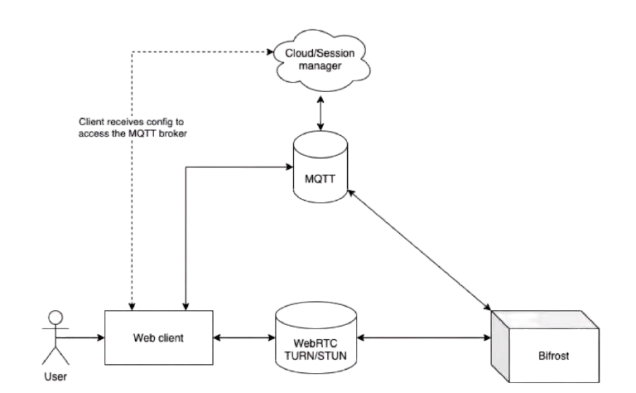
In the BifrostConnect solution, both the web client and the Bifrost Unit authenticate themselves to the BifrostConnect Service, communicating over industry-standard encrypted channels utilizing Transport Layer Security (TLS). This encryption is separate from the peer-to-peer (P2P) encryption that occurs between the web client and the Bifrost Unit, which is secured via Datagram Transport Layer Security (DTLS) encryption through WebRTC.
WebRTC is a robust technology commonly used in online conferencing systems such as Microsoft Teams, Google Meet, among others
While the BifrostConnect Service facilitates these P2P sessions and maintains the ability to terminate such sessions, it’s important to note that it does not have the ability to access userdriven content within a P2P session. This is due to the DTLS encryption being negotiated directly between the web client and the Bifrost Unit, ensuring an additional layer of security.
Protocols and Firewalls
The solution employs a mix of TLS-encrypted secure WebSocket and HTTPS traffic for communication with the BifrostConnect Service and DTLS-encrypted peer-to-peer traffic between the web client and a Bifrost Unit.
The BifrostConnect Service’s traffic encompasses HTML and javascript pages for the user interface, a select number of REST API endpoints for managing access tokens, and an MQTTbased publish/subscribe messaging channel over TLS WebSockets. Primarily, the security of the BifrostConnect Security BifrostConnect Service’s access control is bolstered by the MQTT access control layer, ensuring communication only occurs on authorized message topics.
Regarding external firewalls positioned between the web client and the BifrostConnect Service and between the Bifrost Unit and the BifrostConnect Service, the only apparent communication is HTTPS traffic via port 443 to various subdomains of gotobifrost.com and WebRTC traffic, which includes access to TURN servers. This ensures UDP-based WebRTC traffic can pair endpoints and pass through the Firewall. As most web conference systems leverage the same technology, corporate firewalls are likely already configured to accept this type of traffic.
Session Types
Each of the session types adheres strictly to the advanced security measures provided by WebRTC and BifrostConnect Zero Trust principles tailored for our sessions.
Direct Native Access
Direct Native Access consists of the KVM, Serial Terminal, and SSH session types. They leverage standard I/O communication protocols, thus eliminating the need for driver installations when interfacing with a Bifrost Unit. In situations where the Bifrost Unit uses in-band internet connections via LAN, the network connected to the unit cannot be modified or controlled, as the unit solely uses the network to establish a connection to BifrostConnect Services and necessitates DHCP or a static IP.
Initiating a Direct Native Access Session requires the privileged user to authenticate via a multifactor-protected web interface, as detailed in the Session Authentication section. Any operation performed during a Direct Native Access Session is processed locally, ensuring data never leaves the security perimeter.
BifrostConnect does not grant the operator additional user rights beyond those conferred by the organization’s internal IT administration or security policies. For example, the operator must authenticate using their credentials if a remote device is password-protected during login or bootup.
The USB Key Storage Emulation feature, available during Direct Native Access Sessions, permits operators to mount the Bifrost Unit’s 6GB internal storage (up to 28 GB option) as a USB Key for transferring files from the storage to the endpoint. However, Direct Native Access Sessions do not support direct remote file transfers. The Bifrost Unit’s internal storage is compatible with local encryption tools like BitLocker(Only via local USB connection). File transfers are possible if the organization has implemented either the Direct File Transfer or Offline File Transfer products and the feature is enabled during the session.
Each session type can be illustrated as follows:
KVM setup:
Serial Terminal Setup
SSH
Bifrost-to-Bifrost Tunnels
Bifrost-to-Bifrost Tunnels enable secure, end-to-end encrypted communication between two Bifrost Units. Sessions are created on demand, with no session data stored on any server. These tunnels follow the principle of Least Privilege—only Users or Admins with the necessary permissions can initiate sessions and define which devices and ports are accessible.
Regardless of tunnel type, endpoint IP addresses are never exposed to the internet, devices, applications, or unauthorized users. This setup prevents network scans and supports inside-out connectivity, allowing access to equipment even if it’s offline or behind a firewall. Bifrost-to-Bifrost Tunnels can also support Air-gapped Remote Access, keeping devices isolated from the internet while maintaining secure, real-time control.
Users with access to the destination unit, labeled “Bifrost Unit A” in the technical illustrations below, can operate the equipment without needing user credentials.
Pros: This provides a fast way to grant access and avoids creating user credentials, which could be vulnerable after the session ends.
Cons: Audit trails for users accessing Bifrost Unit A are limited. It’s recommended that users with access to Unit A be manually identified and verified before starting a session.
Bifrost-to-Bifrost: IP Tunnel
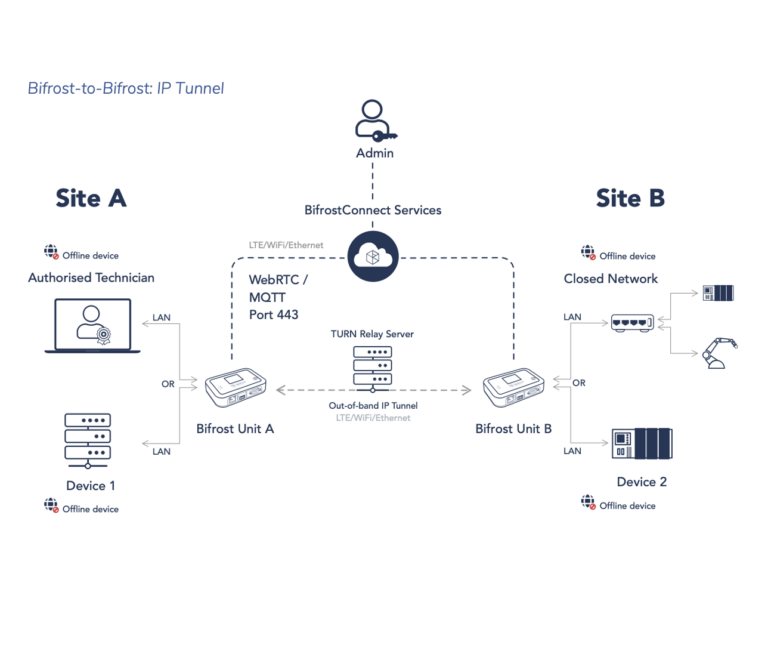
In the technical illustration, the Bifrost Unit at Site A is set up as the IP/Port forwarding destination. At Site B, the Bifrost Unit is set up as the IP/Port forwarding Source. As the master or receiving end, Site A initiates either Pull or Push requests during sessions. This selection can be adjusted dynamically.
Upon initiation and configuration, endpoints connected to the Bifrost Units at Site A and Site B form a closed network, allowing communication only with the IPs and Ports defined by the privileged user. By design, it is impossible to perform network scans of the endpoints through a Bifrost IP Tunnel.
Bifrost-to-Bifrost: Serial Tunnel
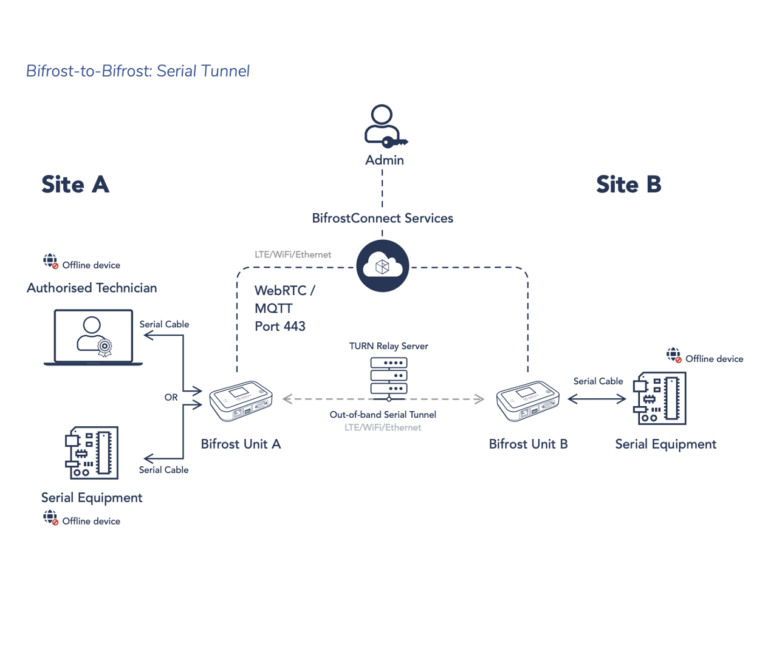
In the technical illustration, the Bifrost Unit at Site A is connected either to the computer you plan to use to operate the serial equipment at Site B or directly to the serial equipment you want to connect to equipment at Site B. At Site B, the Bifrost Unit is connected to the serial equipment.
Once the connection is set up with the correct baud rate, authorized users at Site A can interact with the equipment.
Bifrost-to-Bifrost: USB Tunnel
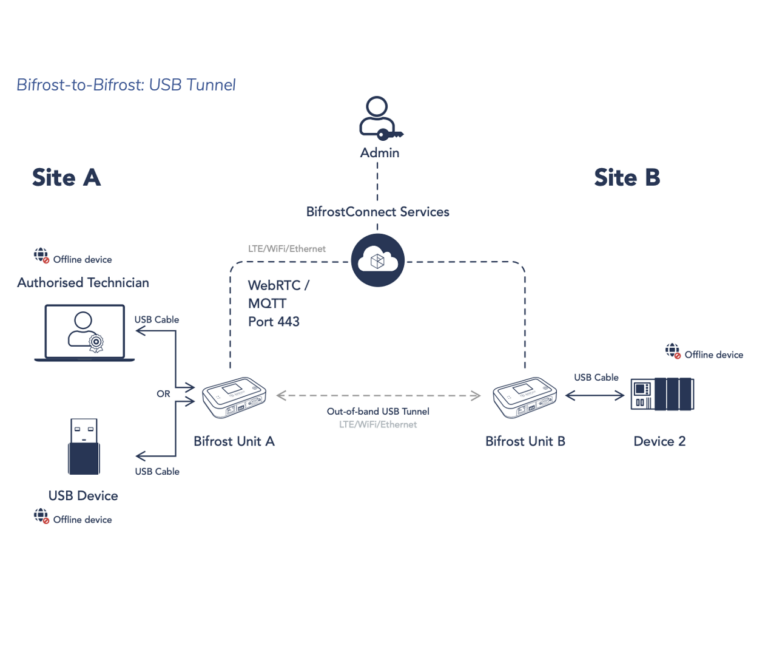
When implementing Bifrost USB Tunnels, Bifrost Units are placed in:
Site A: Use a LAN cable to connect the Bifrost Unit to the computer that will operate the USB equipment.
Site B: Link the Bifrost Unit to the USB Equipment.
After session configuration, devices at both Site A and Site B connected through Bifrost Units will be linked, allowing authorized users at Site A to operate the equipment.
Bifrost Manager
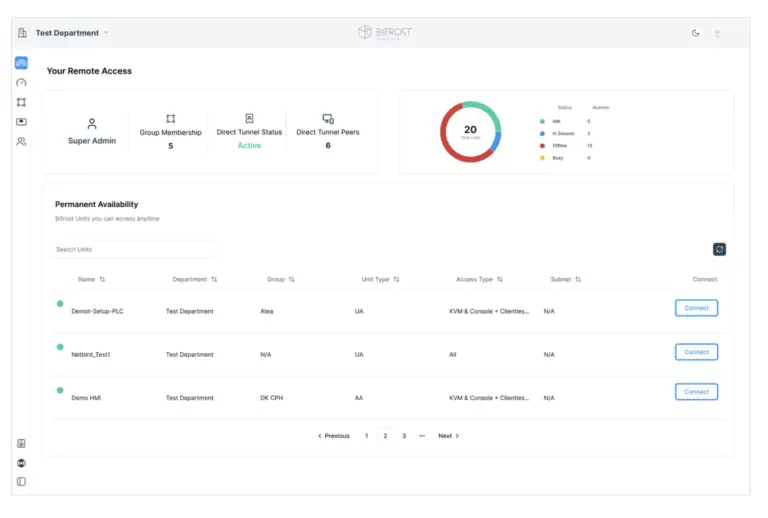
Identity and Access Management
Standard MFA
The BifrostConnect solution incorporates Auth0’s multifactor authentication, an industry-leading security service committed to the highest standards of protection. Auth0 employs a multitude of advanced strategies and technologies, such as continuous security monitoring, automatic threat mitigation, and regular third-party audits, ensuring the reliability and integrity of the multifactor authentication process. Auth0 complies with multiple data privacy and security standards, including ISO 27001/27018, SOC 2 Type 2, and CSA STAR certifications. This robust security infrastructure supports our commitment to providing a secure, reliable, and user-friendly solution.
Learn more about Auth0: https://auth0.com/security
Single Sign-On (SSO)
BifrostConnect supports Single Sign-On (SSO) for clients utilizing BifrostConnect Dedicated Cloud infrastructure, enhancing user convenience without compromising security. This integration allows users to securely access the entirety of your applications and services suite through a single login, eliminating the need to remember separate credentials for each service. When authentication is required, users are seamlessly redirected to the designated authentication domain. Should the user already be logged in, they are immediately redirected back to the original domain without needing re-authentication.
Protocols supported:
- SAML
- Auth2
- AD/LDAP
Learn more about SSO: https://auth0.com/docs/authenticate/single-sign-on
Least Privilege
The principle of least privilege ensures that every user or system is granted the minimum access levels necessary to fulfill their tasks or responsibilities. This approach restricts access to sensitive data and resources, reducing the risk of data breaches and cyber-attacks. If a user or program is compromised, the attacker’s activities are confined to the privileges of that compromised user or program.
Just-in-Time
The “Just-in-Time” principle ensures that access is granted as needed and only for a duration necessary to complete a specific task or function. This ensures that access permissions are only active during the timeframe of need, minimizing the window of opportunity for attackers to exploit these privileges.
For Direct IP Tunneling, subnet mappings can be configured as time-based or permanent, depending on the use case defined by the administrator. All remaining remote access types are session-based, meaning that once the task is completed, the session is terminated. If the operator wishes to reconnect, a new session with valid authentication is required, further minimizing the risk of unauthorized access or lateral movement within the network.
User Roles and Groups
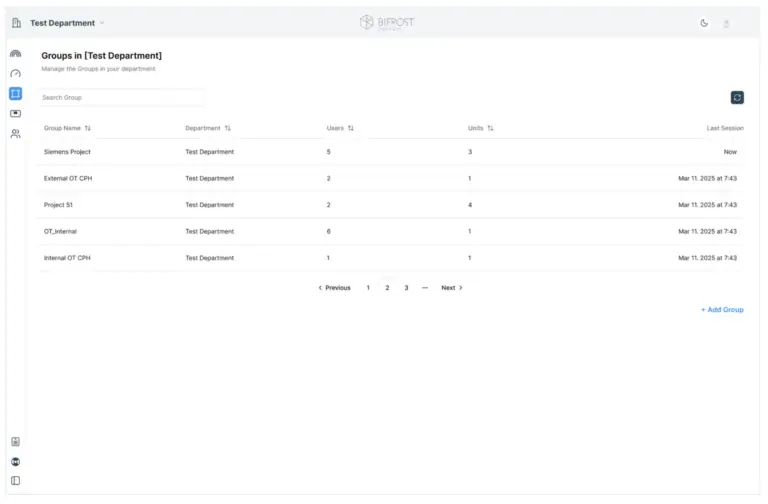
Within the BifrostConnect Manager, a feature enables the definition of user policies. This functionality can be utilized to establish guidelines and regulations for user behavior and access privileges.
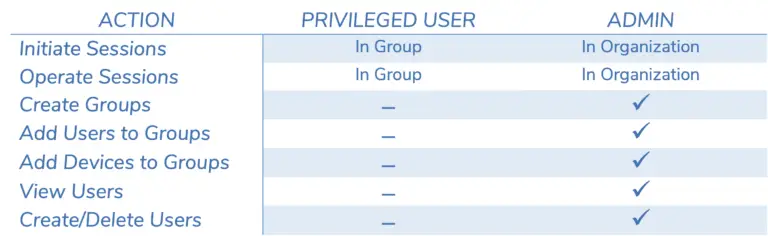
A detailed version of the Bifrost Permission Matrix is available upon request.
Audit Logging
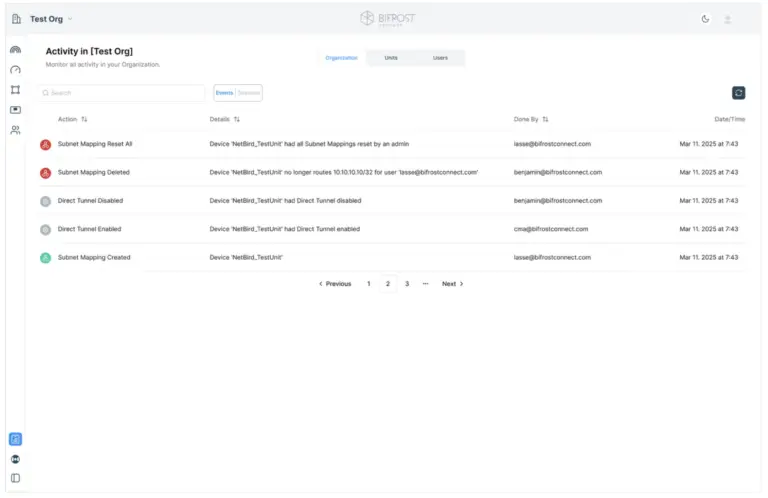
BifrostConnect offers audit logging capabilities to the manager to facilitate continuous monitoring and detailed documentation of activities across the client organization. This feature empowers users with the ability to track, record, and review actions, enhancing transparency and promoting accountability within client infrastructure.
Telemetry data
BifrostConnect Service receives the following telemetry data from the Bifrost Unit:
- Session duration
- Session count
- IP address assigned to Bifrost by DHCP/WAN
- Timing of user logins on gotobifrost.com (without specifying the connected Bifrost Unit)
- Most recent online status of Bifrost Unit
- List of nearby WIFI access points (SSID)
- Battery status and 4G signal strength
- Data traffic statistics for 4G and BifrostConnect Service usage
- Unique serial number/name of the Bifrost Unit
- Approximate location based on cell towers if connected to 4G/LTE (no GPS capabilities)
Privacy
All data in transit between the Bifrost Unit and the BifrostConnect Service/web session is encrypted, ensuring no user data is retained on either the Bifrost Unit or the service. Additionally, WIFI passwords are preserved in a hashed format on the specific Bifrost Unit but are not stored within the BifrostConnect Service.
Our privacy policy is available at https://bifrostconnect.com/privacy-policy/
SIEM Integration
BifrostConnect supports Security Information and Event Management (SIEM) Integration for clients utilizing the private BifrostConnect Dedicated Cloud infrastructure. This technology compiles event log data from numerous sources, promptly detects unusual activity through realtime analysis, and initiates corrective measures. SIEM provides organizations with vital insights into their network activity, enabling a rapid response to potential cyber threats and compliance adherence.
Hardware Security
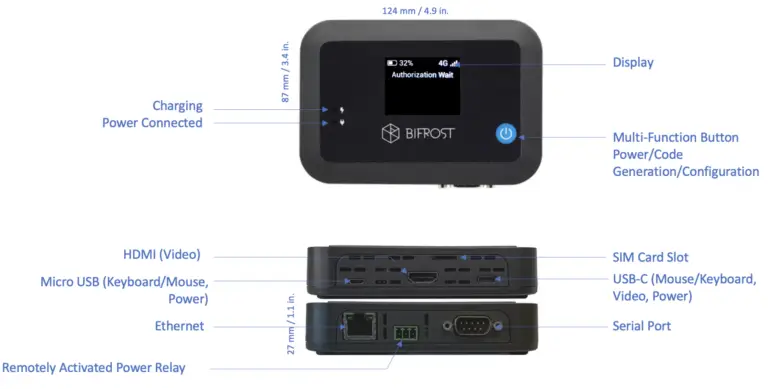
The Bifrost Unit
The Bifrost Unit operates on an Industrial embedded Linux and is fortified with regular security patch updates through Over-the-air (OTA) technology. The Linux core is stripped of all non-essential services, and only those required for the BifrostConnect Service are installed. Therefore, the only listening port on the Bifrost is 443.
Several security measures have been implemented to ensure the physical and digital security of the Bifrost Unit.
- To prevent alteration of the Bifrost Unit after firmware loading, the only way to modify the signed firmware is through an OTA update. Changing other settings occurs via encrypted MQTT/WebRTC through the BifrostConnect Services.
- There are no physical service ports or debugging interfaces on the Bifrost Unit, and no local users exist on the internal Linux platform. Furthermore, uniquely generated device keys are generated and can be revoked.
- All fuses on the Bifrost are burnt (non reversible), preventing booting from alternative storage or devices.
- Direct IP or Serial communication to reach the Bifrost Unit, such as SSH, is impossible, as no services are installed, and no local web services exist on the Bifrost Unit.
Firmware Upgrades
Firmware upgrades are only possible via the BifrostConnect Service. The BifrostConnect Service monitors each Bifrost Unit firmware version and displays it in the BifrostConnect Manager. If a Bifrost Unit’s firmware version is not current, the BifrostConnect remote interface or the Bifrost Manager will display a prompt to update it, ensuring optimal performance. The user can click the button, which sends a message to the Bifrost Unit, letting it know there is a new firmware update to download. When initiated, the Bifrost Unit registers the update request and starts to download the firmware using HTTPS. To ensure the ongoing session remains fully functional, the firmware update is postponed while a remote session is active and will resume once the session has ended. When the session is terminated, the Bifrost Unit, verifies the signed firmware, applies the update, and restarts.
Unit Variations
The BifrostConnect Units come in two versions:
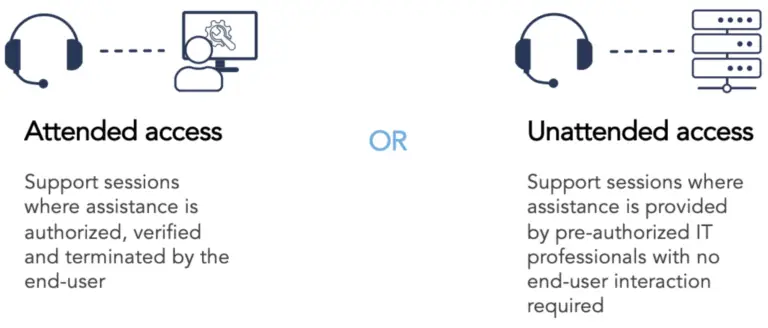
Each Bifrost Unit is explicitly produced as either an Attended or Unattended Unit. This selection is embedded in the unit, ensuring the chosen role remains consistent throughout the product’s lifespan.
As a result of this variation, Attended Units are inaccessible in Unattended Sessions, and similarly, Unattended Units cannot be accessed during Attended Sessions.
Unit Authentication
Despite the solution’s fundamental consistency, the protocols and guidelines regarding security, trust, and authentication are tailored to meet the specific needs of each use case.
Attended access
Attended Access requires an on-site person to initiate remote access between the connected device and the Operator seeking to access the device remotely. Attended Access utilizes Time-based One-time Password (TOTP) technology generated by a physical press on the BifrostConnect Unit. The generated password is displayed on the Unit screen and, by default, changes every 60 sec. An Admin can configure the lifespan of an OTP in the Manager. To establish a session, the Operator must log in to gotobifrost.com (also MFA protected) or the Manager, enter his/her credentials, and then enter the eight-digit password (TOTP). The on-site person can disconnect the session anytime by pressing a button on the Unit.
Note: TOPT is only compatible with session-based remote access and does not support Direct Tunnels.
Unattended access
The operator can initiate Unattended Access without the need for an on-site individual.
Access to Unattended Access is gained through the Manager. By default, the Manager authentication process involves a combination of user credentials and multi-factor authentication (MFA), such as a Time-based One-time Password (TOTP) delivered through a trusted authenticator app.