Company
Support
Login
BifrostConnect BifrostConnect
  • How it Works
    Zero Trust by design
    How it Works
    Direct Tunnel Access
    Direct IP Tunnel

    Identity-based network access in minutes

    USB Tunnel

    Configure USB devices remotely

    Clientless Serial Tunnel

    Establish a Serial (RS232) connection without borders

    Clientless IP Tunnel

    Create a Zero Trust network without VPN Tunneling

    Offline File Transfer

    Transfer files without exposing endpoints to the internet

    Direct Native Access
    KVM Access

    Gain physical control and process data on-premise

  • Who We Help
    Operations
    Engineering & Commissioning
    Cybersecurity & Compliance
  • Industries
    Energy & Utilities
    Water Management
    Industrial Automation & Manufacturing
    Pharma, Life Science & Healthcare
    Testing, Inspection & Certification
    Logistics, Transportation & Maritime
    Banking & Financial Services
  • Case Studies
    Damgaard Automatik Case Study
    SGS Case Study
    Luságua Case Study
  • Resources
    Company
    Zero Trust by design
    Release Notes
    Knowledge Center
    Tours & Tutorials
    FAQ
    Blog
    NIS2
  • Pricing
Contact Us
BifrostConnect
  • How it Works
    Zero Trust by design
    How it Works
    Direct Tunnel Access
    Direct IP Tunnel
    USB Tunnel
    IP Tunnel
    Serial Tunnel
    Offline File Transfer
    Direct Native Access
    KVM Access
  • Who We Help
    Cybersecurity & Compliance
    Engineering & Commissioning
    Operations
  • Industries
    Energy & Utilities
    Water Management
    Industrial Automation & Manufacturing
    Pharma, Life Science & Healthcare
    Testing, Inspection & Certification
    Logistics, Transportation & Maritime
    Banking & Financial Services
  • Resources
    Company
    Zero Trust by design
    Release Notes
    Knowledge Center
    Tours & Tutorials
    FAQ
    Blog
  • Pricing
  • Support
Book a Demo
Contact Us

Getting Started

12
  • Admin
    • Set up your organization
    • User roles and permissions
  • Onsite User Guides
    • Onsite Step Guide
    • Connect KVM
    • Connect IP Tunnel
    • Connect Offline File Transfer
    • Connect USB Tunnel
    • Connect Serial Tunnel
    • Connect SSH
    • Connect Serial Terminal (Console Access)
  • Datasheets
    • Technical Specifications
    • Requirements

Technical Support

2
  • Feedback & Feature requests
    • Share your ideas and feedback
  • Report a bug
    • Reporting Bugs 

Release Notes

19
  • 2026
    • Bifrost Release 13 January 2026
  • 2025
    • Bifrost Release 30 Oktober 2025
    • Bifrost Release 19 August 2025
    • Bifrost Release 30 June 2025
    • Bifrost Release 11 February 2025
  • 2024
    • Bifrost Release 04 December 2024
    • Bifrost Release 16 November 2024
    • Bifrost Release 2 Oktober 2024
    • Bifrost Release 14 August 2024
    • Bifrost Release 7 May 2024
    • BifrostConnect Firmware V4.8.0
  • 2023
    • BifrostConnect Firmware V4.7.0
    • BifrostConnect Firmware V4.6.0
    • BifrostConnect Firmware V4.5.0
    • BifrostConnect Firmware V4.4.0
  • 2022
    • BifrostConnect Firmware V.4.3.2
    • BifrostConnect Firmware V.4.3.1
    • BifrostConnect Firmware V.4.2.0
  • 2021
    • BifrostConnect Firmware V.4.0.0
  • Home
  • Knowledge Center
  • Getting Started
  • Admin
  • Set up your organization
View Categories

Set up your organization

The Manager overview

Welcome to the BifrostConnect Manager
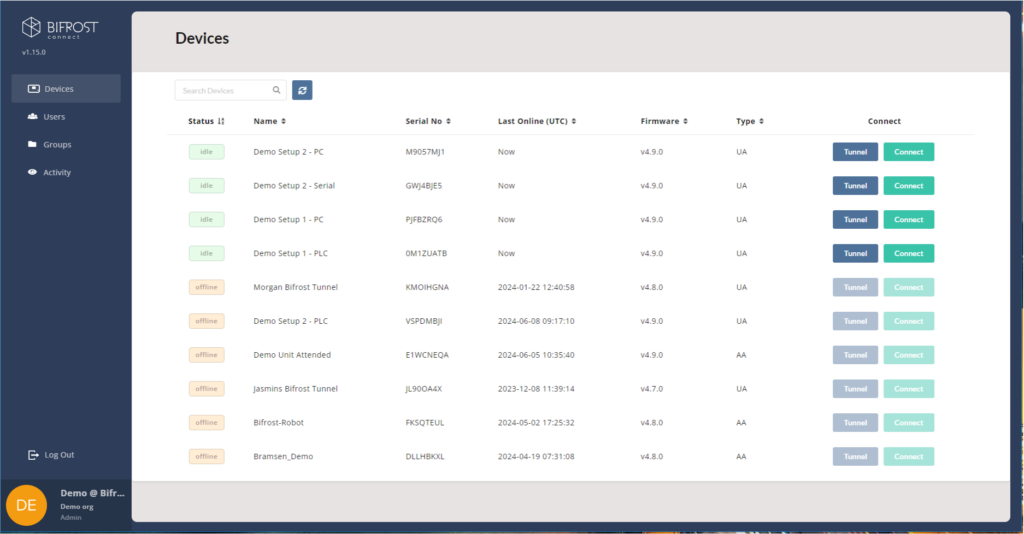
From here you get an overview of all your BifrostConnect Units. You can manage users, see the activity of your units, or create Groups to limit access to certain Bifrost Units.

User Management
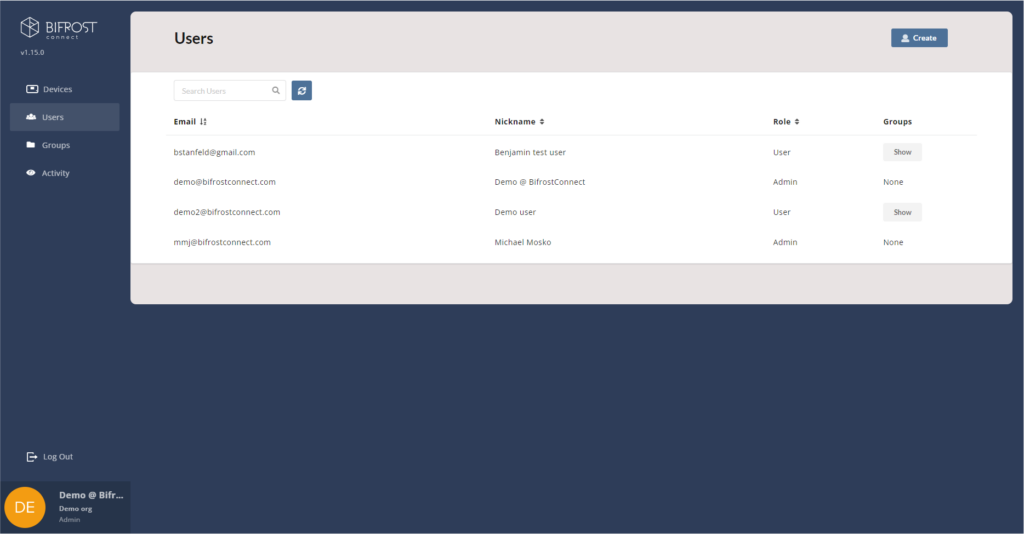
Here are the User Management where you can easily add more users and create groups if you are an administrator.

When creating a user, you can select the necessary access roles (Admin or User), and/or select which group the user belongs to, 

Users (not Admins) must be put in a Group,  otherwise their Device list will be empty.

User details

You can further manage a user by clicking on the name and then you can see more information, or you can delete user and reset 2FA if a user lose access to their authentication app.

Group Management
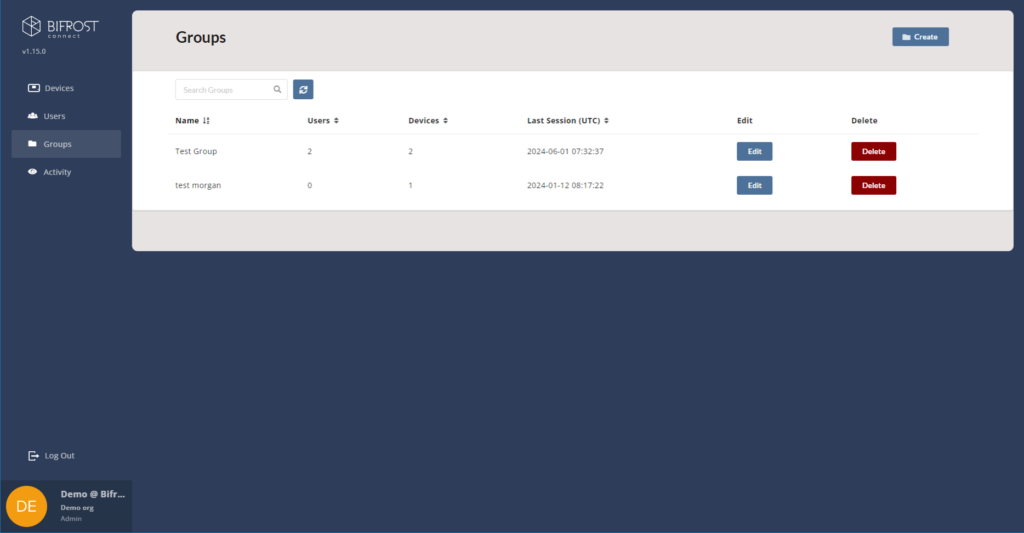
This is the Group management where you can easily create groups and limit the access to users.

Maybe you have an external vendor that needs access to a specific Bifrost Unit.


“Admins” can see everything and does not need to belong in a group,  but “Users” must be put in a group to get access to a Bifrost Unit.

This also limits what a user can see. If they are without a group, their device list in the Manager will be empty.

Here is a Group example.

It must contain at least one Bifrost and one user. 

Updated on June 17, 2024
Table of Contents
  • The Manager overview
  • User Management
  • User details
  • Group Management
Essentials Logo
Islands Brygge 55
2300 Copenhagen S, Denmark
+45 70 60 20 56
[email protected]
About Us
Release Notes
Privacy Policy
Terms & Conditions
FAQ
Book a Demo
Book a Demo

Subscribe to Our Newsletter

Copyright BifrostConnect ApS. 2024
All Rights Reserved