Company
Support
Login
BifrostConnect BifrostConnect
  • How it Works
    Zero Trust by design
    How it Works
    Direct Native Access (DNA)
    Direct Tunnel Access (DTA)
    Clientless Tunnel Access (CTA)
    Clientless IP Tunnel

    Create a Zero Trust network without VPN Tunneling

    Clientless Serial Tunnel

    Establish a Serial (RS232) connection without borders

    Offline File Transfer

    Transfer files without exposing endpoints to the internet

  • Who We Help
    Case Studies
    Damgaard Automatik Case Study
    SGS Case Study
    Luságua Case Study
    Operational Technology
    Engineering & Commissioning
    Cybersecurity & Compliance
    Industries
    Energy & Utilities
    Water Management
    Vandværker
    Industrial Automation & Manufacturing
    Pharma, Life Science & Healthcare
    Testing, Inspection & Certification
    Logistics, Transportation & Maritime
    Banking & Financial Services
  • Resources
    Company
    Zero Trust by design
    Release Notes
    Knowledge Center
    Tours & Tutorials
    FAQ
    Blog
    NIS2
  • Pricing
  • OT Cybersecurity
    Best-practice Guide for Secure 3rd party remote access in OT
    OT Cybersecurity Landscape: Denmark 2027
    NIS2 Remote Access WHITE PAPER
Contact Us
BifrostConnect
  • How it Works
    Zero Trust by design
    How it Works
    Direct Native Access (DNA)
    Direct Tunnel Access (DTA)
    Clientless Tunnel Access (CTA)
    Clientless IP Tunnel
    Clientless Serial Tunnel
    Offline File Transfer
  • Who We Help
    Cybersecurity & Compliance
    Engineering & Commissioning
    Operations
    Industries
    Energy & Utilities
    Water Management
    Vandværker
    Industrial Automation & Manufacturing
    Pharma, Life Science & Healthcare
    Testing, Inspection & Certification
    Logistics, Transportation & Maritime
    Banking & Financial Services
  • Resources
    Company
    Zero Trust by design
    Release Notes
    Knowledge Center
    Tours & Tutorials
    FAQ
    Blog
  • Pricing
  • Support
  • OT Cybersecurity
    OT Cybersecurity Landscape: Denmark 2027
    Best-practice Guide for Secure 3rd party remote access in OT
    NIS2 Remote Access WHITE PAPER
Book a Demo
Contact Us

Getting Started

12
  • Admin
    • Set up your organization
    • User roles and permissions
  • Onsite User Guides
    • Onsite Step Guide
    • Connect KVM
    • Connect IP Tunnel
    • Connect Offline File Transfer
    • Connect USB Tunnel
    • Connect Serial Tunnel
    • Connect SSH
    • Connect Serial Terminal (Console Access)
  • Datasheets
    • Technical Specifications
    • Requirements

Technical Support

2
  • Feedback & Feature requests
    • Share your ideas and feedback
  • Report a bug
    • Reporting Bugs 

Release Notes

21
  • 2026
    • Remote Access Interface Release 25 June 2026
    • Direct Tunnel Release 1 June 2026
    • Bifrost Release 13 January 2026
  • 2025
    • Bifrost Release 30 Oktober 2025
    • Bifrost Release 19 August 2025
    • Bifrost Release 30 June 2025
    • Bifrost Release 11 February 2025
  • 2024
    • Bifrost Release 04 December 2024
    • Bifrost Release 16 November 2024
    • Bifrost Release 2 Oktober 2024
    • Bifrost Release 14 August 2024
    • Bifrost Release 7 May 2024
    • BifrostConnect Firmware V4.8.0
  • 2023
    • BifrostConnect Firmware V4.7.0
    • BifrostConnect Firmware V4.6.0
    • BifrostConnect Firmware V4.5.0
    • BifrostConnect Firmware V4.4.0
  • 2022
    • BifrostConnect Firmware V.4.3.2
    • BifrostConnect Firmware V.4.3.1
    • BifrostConnect Firmware V.4.2.0
  • 2021
    • BifrostConnect Firmware V.4.0.0

Best Practice Guide

14
  • About this guide
  • Core Framework
  • Architecture & Principles
  • Threat Context
  • Zero Standing Privilege
  • Four OT Access Patterns
  • Degraded Mode & Legacy Equipment
  • Defence in Depth
  • Compliance & Implementation
  • Residual Risks
  • Definitions
  • References
  • Operational Lifecycle 
  • Procurement Appendix

Implementing the OT Best Practice Framework with BifrostConnect

6
  • Overview and Framework Mapping
  • Threat Model
  • Scenario Implementation – Scenario 1
  • Scenario Implementation – Scenario 2
  • Scenario Implementation – Scenario 3
  • Scenario Implementation – Scenario 4
  • Home
  • Knowledge Center
  • Getting Started
  • Datasheets
  • Technical Specifications
View Categories

Technical Specifications

Applicable to Hardware Unit revision 1.0 and 1.5

These technical specifications were updated on 1st July 2023 (version 2.3) 

The BifrostConnect Solution consists of the following components:

  1. The Hardware Unit which is a compact remote-control unit. 
  2. The Services:
    • Core Services which provide session authentication, session bridge, web based session interface.
    • Optional Services including identity and access management, audit logging and API integrations.
 Input/Output USB-C Video input, keyboard/mouse output and recharging Micro-USB Recharging, keyboard/mouse, RS232 emulation, and USB Tunnel sessions 
 Ethernet RJ45 Network, PoE 48V charging, and IP Tunnel sessions RS232 Serial Terminal and Serial Tunnel sessions 
 SPDT Rated load 0.3 A at 125 VAC, 1 A at 30 VDCRated carry current 2 AMax. switching voltage 125 VAC, 60 VDCMax. switching current 1 A Bluetooth 4.0 Keyboard/mouse input  
 HDMI Video input (480p, 720p, 1080p)SIM tray Nano-SIM  
   
 Performance Battery type Industrial RRC1120 – 1S1P (UL2054 certified) Battery power 3.70V / 2000mAh / 7.4Wh
 Power consumption 9-watt MaxBattery usage ~2 hours 
 Auto power-on Activated on AC/DC input (This feature is only supported by Hardware Unit 1.5) Operating temperature –41 to 104 °F (5 to 40 °C)
 Humidity Maximum 85% non-condensing relative humidity 
   
 Connectivity LAN 10/100 Mbit Ethernet LAN Full Duplex   Wi-Fi 802.11n 2.4 GHz WPA/WPA2 PSK/AES
   
 Cellular 4G modem with CAT-4 speeds up to 150Mbit download and 50Mbit upload 
 Hardware Unit revision 1.0 supports cellular-based networks with 4G LTE networks (2600 MHz, 2100 MHz, 1800 MHz, 900 MHz, and 800 MHz). Applicable but not limited to Europe (CE marking). 
 Hardware Unit revision 1.5 supports cellular-based networks with 4G LTE networks B1 (FDD 2100), B2 (FDD 1900), B3 (FDD 1800), B4 (FDD 1700 / AWS), B5 (FDD 850), B7 (FDD 2600), B8 (FDD 900), B12 (FDD 700ac), B13 (FDD 700c), B14 (FDD 700PS), B19 (FDD 800), B20 (FDD 800DD), B26 (FDD 850), B28 (FDD 700). Applicable but not limited to North America (FCC marking).
 Software Firmware Industrial embedded Linux (upgradable via OTA)Attended AccessUnattended Access  Core Services Session authenticationSession interfaceBridge (KVM Access, IP Tunnel, Serial Tunnel, USB Tunnel, SSH, Serial Terminal, Offline File Transfer) 
 Data channel Encrypted WebRTCOptional Services Including identity and access management, audit logging and API integrations
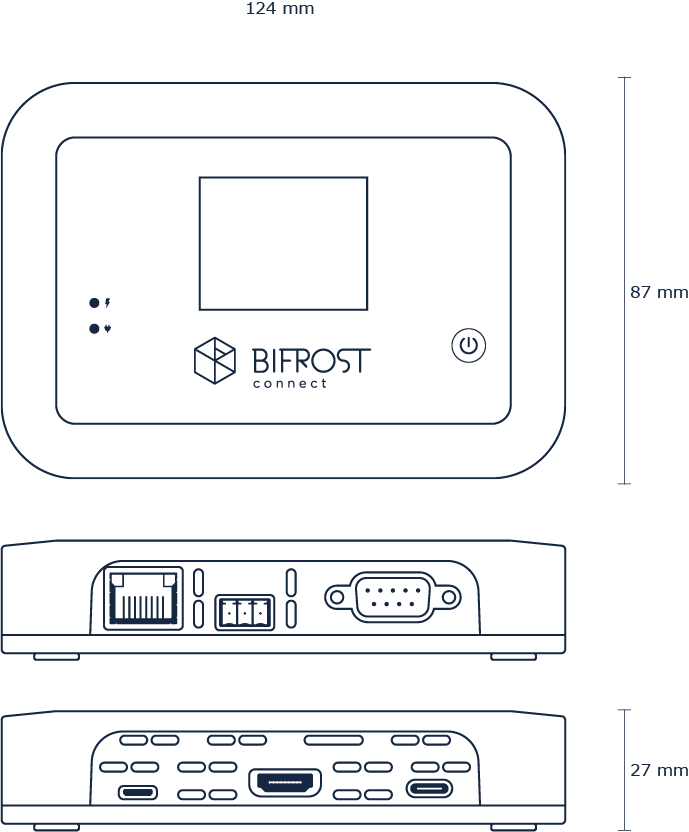
 Physical Dimensions L-124mm W-87mm H-27mm Weight 250 g
 LCD Display 2” TFTClassification Rating IP20
Updated on June 14, 2024
RequirementsRequirements
Essentials Logo
Islands Brygge 55
2300 Copenhagen S, Denmark
+45 70 60 20 56
[email protected]
About Us
Release Notes
Privacy Policy
Terms & Conditions
FAQ
Book a Demo
Book a Demo

Subscribe to Our Newsletter

Copyright BifrostConnect ApS. 2026
All Rights Reserved